- November 16, 2026
- Tejhaksh
- 0 Comments
- Microsoft, Uncategorized
AWS vs Microsoft Azure vs Google Cloud: Which Cloud Platform Is Best in 2026?
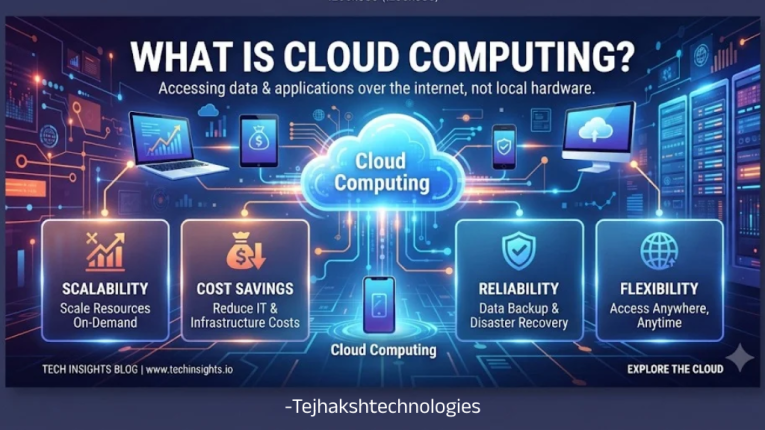
Introduction
Cloud technology has become an essential part of the modern digital world. From hosting websites and managing business applications to storing massive amounts of data and developing AI-powered solutions, cloud computing is helping organizations operate more efficiently.
Instead of purchasing expensive servers and maintaining complex IT infrastructure, businesses can now access computing resources online through cloud service providers.
Among the leading names in this industry are Amazon Web Services (AWS), Microsoft Azure, and Google Cloud Platform (GCP). All three offer powerful cloud solutions, but their capabilities, pricing structures, tools, and technology ecosystems are different.
So, which platform should you choose in 2026? Is AWS a better option for startups? Does Azure make more sense for Microsoft-based businesses? And is Google Cloud the right choice for companies working with artificial intelligence and big data?
In this detailed comparison, we will explore AWS vs Microsoft Azure vs Google Cloud, covering their major features, services, pricing, security, advantages, limitations, and business use cases. By the end, you will have a clearer idea of which cloud platform matches your requirements.
What Is Cloud Computing?
Cloud computing is a technology that allows individuals and businesses to use computing resources over the internet instead of purchasing and maintaining their own physical hardware.
These resources include virtual servers, databases, storage systems, networking, software, and computing power.
Traditionally, companies needed dedicated servers, physical space, IT staff, and regular hardware maintenance to operate their applications. Cloud computing offers an alternative by allowing organizations to rent these resources from specialized providers.
For example, consider an e-commerce business that operates an online shopping website. It needs to store product images, customer details, order information, and payment records. It must also handle sudden increases in website visitors during sales and festive seasons.
With cloud computing, the business can access additional resources whenever required without building its own data center.
Major Benefits of Cloud Computing
Cloud technology provides several advantages for businesses, developers, and startups.
1. Reduced Infrastructure Expenses
Businesses can avoid large upfront investments in physical servers, networking equipment, and maintenance. They can pay for cloud resources according to their usage and selected pricing plans.
2. Flexible Scalability
Cloud resources can be increased when application traffic grows and reduced when demand falls. This flexibility helps businesses manage changing workloads.
3. Remote Accessibility
Cloud-hosted applications and information can be accessed through the internet, allowing employees to work from different locations.
4. Data Backup and Recovery
Cloud platforms offer backup and recovery services that help businesses protect important information and restore data when required.
5. Security Management
Features such as encryption, identity management, access permissions, and security monitoring help organizations protect their digital infrastructure.
6. Improved Application Performance
Cloud providers operate infrastructure across multiple geographical regions, allowing businesses to deploy applications closer to their users.
Although AWS, Azure, and Google Cloud offer many of these benefits, their individual services and ecosystems make them suitable for different types of workloads.
1. What is Amazon Web Services (AWS) ?
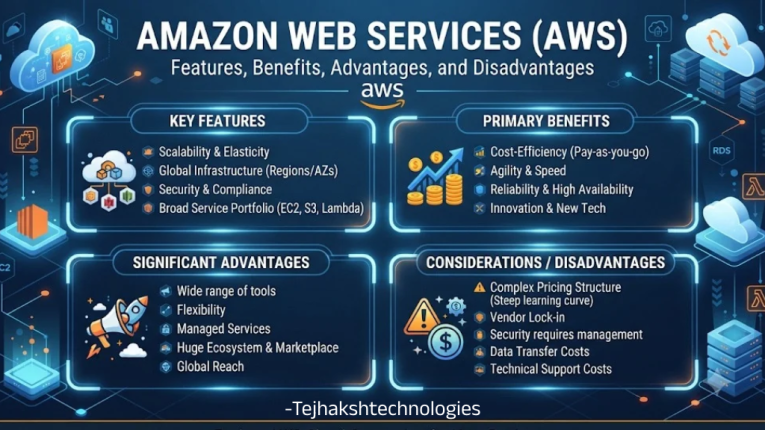
Amazon Web Services, commonly known as AWS, is Amazon’s cloud computing platform. It provides a wide collection of services that businesses can use to host websites, operate applications, store information, manage databases, and develop modern digital products.
One of AWS’s major strengths is its extensive service ecosystem. It supports businesses at different stages, from small startups to large enterprises with complex infrastructure requirements.
Important Features of AWS
1. Amazon EC2
Amazon Elastic Compute Cloud (EC2) provides virtual servers that businesses can use to run applications, host websites, and handle computing workloads.
Users can select server configurations based on their processing power, memory, and storage requirements.
2. Amazon S3
Amazon Simple Storage Service (S3) is designed for storing digital files and unstructured data.
Businesses commonly use it for website assets, images, videos, documents, application files, and backups.
3. Amazon RDS
Amazon Relational Database Service (RDS) simplifies the process of setting up and managing relational databases.
It supports database engines such as MySQL, PostgreSQL, MariaDB, Oracle Database, and Microsoft SQL Server.
4. AWS Lambda
AWS Lambda is a serverless computing service that allows developers to execute code without managing traditional servers.
It is useful for event-driven applications, automated processes, background tasks, and backend functions.
5. Amazon Bedrock
Amazon Bedrock helps developers build generative AI applications using different foundation models through a managed service.
It can support the development of AI assistants, chatbots, content-generation applications, and other intelligent business tools.
Advantages of AWS
- Extensive Service Portfolio: Offers a wide selection of computing, storage, networking, database, and AI services.
- Flexible Infrastructure: Allows businesses to configure resources according to their workload requirements.
- Global Infrastructure: Provides cloud infrastructure across multiple geographical regions.
- Startup-Friendly Options: Supports growing businesses with flexible cloud resources.
- Multiple Database Choices: Offers different database solutions for various application requirements.
- Automation Capabilities: Services like AWS Lambda help reduce repetitive server-management tasks.
- Developer Ecosystem: Supports integration with many popular development tools and technologies.
Disadvantages of AWS
- Complex for New Users: Its large number of services can make the platform difficult to understand initially.
- Pricing Complexity: Different billing models and service charges require careful monitoring.
- Technical Expertise: Advanced infrastructure configurations often require experienced cloud professional
- Unexpected Expenses: Poor resource management can result in unnecessary monthly costs.
Who Should Use AWS?
AWS can be a suitable platform for organizations that need flexible infrastructure and a broad selection of cloud services.
It is particularly useful for:
- Startups building scalable digital products.
- E-commerce businesses handling changing website traffic.
- SaaS companies developing cloud-based software.
- Organizations hosting high-traffic websites.
- Businesses requiring flexible storage and computing resources.
- Developers building modern applications.
2. What is Microsoft Azure ?
Microsoft Azure is Microsoft’s cloud computing platform. It allows organizations to host applications, store business information, manage databases, and access computing resources through the internet.
One of Azure’s biggest advantages is its integration with Microsoft’s existing technology ecosystem.
Companies already working with Windows Server, Microsoft 365, SQL Server, and Microsoft Entra ID can connect their existing systems with Azure services.
Another important capability is hybrid cloud support. It allows organizations to combine their existing on-premises infrastructure with cloud-based resources, making gradual cloud adoption easier.
Important Features of Microsoft Azure
1. Azure Virtual Machines
Azure Virtual Machines provide cloud-based computing environments that work like traditional computers.
Businesses can use them to operate websites, business applications, databases, and other software systems.
2. Azure Blob Storage
Azure Blob Storage is designed to store large quantities of unstructured data.
It can handle images, videos, documents, backups, website files, and information generated by applications.
3. Azure SQL Database
Azure SQL Database is a managed relational database service based on Microsoft SQL Server technology.
It helps businesses organize and manage information while reducing the need for manual database infrastructure maintenance.
4. Azure Functions
Azure Functions allows developers to execute code automatically when specific events occur.
For example, it can process uploaded files, respond to API requests, perform background operations, and automate application activities.
5. Microsoft Foundry
Microsoft Foundry provides tools for developing and managing AI-powered applications and agents.
Businesses can use its capabilities to create intelligent assistants, generative AI applications, and automated business solutions.
Advantages of Microsoft Azure
- Microsoft Ecosystem Integration: Connects easily with many existing Microsoft products and services.
- Enterprise Capabilities: Offers solutions for organizations with complex IT requirements.
- Hybrid Cloud Support: Helps businesses connect local servers with cloud infrastructure.
- Managed Database Services: Reduces the operational effort involved in database management.
- Identity Management: Microsoft Entra ID provides identity and access management capabilities.
- AI Development: Supports businesses developing intelligent applications and AI-powered solutions.
- Flexible Resources: Allows organizations to select infrastructure based on their requirements.
Disadvantages of Microsoft Azure
- Learning Curve: Beginners may need time to understand its services and configurations.
- Variable Pricing: Costs depend on the services, regions, and resources selected.
- Specialized Knowledge: Advanced deployments may require professionals with Azure experience.
- Configuration Complexity: Managing multiple connected cloud services can require careful planning.
Who Should Choose Microsoft Azure?
Azure is particularly suitable for organizations that already depend on Microsoft technologies or want to move existing IT systems to the cloud.
It can be a strong choice for:
- Companies using Microsoft 365.
- Organizations operating Windows Server applications.
- Businesses using Microsoft SQL Server.
- Enterprises requiring hybrid cloud infrastructure.
- Companies managing employee identities through Microsoft Entra ID.
- Businesses developing enterprise-level applications.
3. What is Google Cloud Platform (GCP) ?
Google Cloud Platform, also called Google Cloud, is Google’s cloud computing ecosystem. It provides infrastructure and managed services for hosting applications, storing data, analyzing information, and developing AI and machine learning solutions.
Google Cloud has developed a strong presence in areas such as data analytics, Kubernetes, artificial intelligence, and cloud-native application development.
For organizations that work with large datasets or build intelligent applications, its specialized tools can be particularly useful.
Important Features of Google Cloud
1. Google Compute Engine
Google Compute Engine allows organizations to create virtual machines using Google’s cloud infrastructure.
These virtual machines can run websites, applications, and different computing workloads.
2. Google Cloud Storage
Google Cloud Storage provides scalable online storage for digital information.
Businesses can store images, videos, documents, backups, and application data while choosing storage options based on their usage requirements.
3. Google Cloud SQL
Google Cloud SQL is a managed database service that supports MySQL, PostgreSQL, and SQL Server.
It simplifies database operations by managing many underlying infrastructure and maintenance tasks.
4. Google Kubernetes Engine (GKE)
Google Kubernetes Engine helps developers deploy and manage containerized applications.
It is useful for businesses developing microservices, modern cloud-native applications, and software that needs flexible scaling.
5. BigQuery
BigQuery is Google’s data warehouse and analytics platform.
It allows businesses to process and analyze large datasets without managing traditional database infrastructure.
For example, an online retailer can use BigQuery to understand customer behavior, analyze sales performance, and identify purchasing trends.
6. Vertex AI
Vertex AI provides tools for developing, training, deploying, and managing artificial intelligence and machine learning applications.
Businesses can use it to build predictive models, generative AI solutions, and intelligent software.
Advantages of Google Cloud
- Advanced Data Analytics: BigQuery provides powerful capabilities for analyzing large datasets.
- Kubernetes Support: GKE offers managed infrastructure for container-based applications.
- AI and Machine Learning: Provides tools for building intelligent and predictive applications.
- Scalable Infrastructure: Resources can be adjusted according to workload requirements.
- Google Technology Integration: Works with Google’s development and data technologies.
- Managed Services: Helps reduce infrastructure maintenance through managed databases and serverless options.
- Data-Driven Applications: Particularly useful for businesses that depend on advanced analytics.
Disadvantages of Google Cloud
- Specialized Skills: Some organizations may need to train employees or hire experienced Google Cloud professionals.
- Enterprise Requirements: Businesses should evaluate service capabilities against their specific enterprise needs.
- Cost Management: Multiple active services can make cloud expenses harder to monitor.
- Migration Effort: Moving applications and databases from another provider can require significant planning and technical resources.
Who Should Choose Google Cloud?
Google Cloud can be an excellent option for businesses that prioritize data analysis, AI development, and modern software infrastructure.
It is particularly suitable for:
- Organizations processing large datasets.
- Businesses creating AI-powered products.
- Companies working with machine learning.
- Developers using Kubernetes.
- Organizations developing cloud-native applications.
- Businesses requiring advanced analytics and reporting.
AWS vs Microsoft Azure vs Google Cloud: Detailed Feature Comparison
Now, let’s compare the major features and services offered by AWS, Microsoft Azure, and Google Cloud.
1. Cloud Service Providers
- AWS: Developed and managed by Amazon.
- Microsoft Azure: Developed and managed by Microsoft.
- Google Cloud: Developed and managed by Google.
2. Virtual Machine Services
- AWS: Amazon EC2 – Provides virtual servers for hosting websites and applications.
- Microsoft Azure: Azure Virtual Machines – Offers scalable cloud-based computing resources.
- Google Cloud: Compute Engine – Allows businesses to run virtual machines on Google’s infrastructure.
3. Object Storage Services
- AWS: Amazon S3 – Used to store images, videos, documents, and backups.
- Microsoft Azure: Azure Blob Storage – Provides scalable storage for unstructured data.
- Google Cloud: Cloud Storage – Helps store and manage files and application data.
4. Managed Database Services
- AWS: Amazon RDS – Provides managed relational database services.
- Microsoft Azure: Azure SQL Database – Offers managed SQL database solutions.
- Google Cloud: Cloud SQL – Supports MySQL, PostgreSQL, and SQL Server databases.
5. Serverless Computing
- AWS: AWS Lambda – Executes code without managing traditional servers.
- Microsoft Azure: Azure Functions – Runs code automatically in response to specific events.
- Google Cloud: Cloud Run and Cloud Functions – Support serverless application deployment and event-driven workloads.
6. Kubernetes Services
- AWS: Amazon EKS – Helps deploy and manage Kubernetes applications.
- Microsoft Azure: Azure AKS – Provides managed Kubernetes infrastructure.
- Google Cloud: Google GKE – Supports the deployment and management of containerized applications.
7. Data Analytics Services
- AWS: Amazon Redshift – Used for data warehousing and large-scale analytics.
- Microsoft Azure: Microsoft Fabric – Provides integrated data engineering, analytics, and business intelligence capabilities.
- Google Cloud: BigQuery – Helps analyze large datasets and generate reports.
8. Artificial Intelligence Platforms
- AWS: Amazon Bedrock – Helps developers build generative AI applications.
- Microsoft Azure: Microsoft Foundry – Provides tools to develop and manage AI applications and agents.
- Google Cloud: Vertex AI – Supports AI and machine learning application development.
9. Monitoring Services
- AWS: Amazon CloudWatch – Monitors cloud resources, applications, and performance.
- Microsoft Azure: Azure Monitor – Tracks infrastructure health and application performance.
- Google Cloud: Cloud Monitoring – Helps monitor cloud applications and infrastructure.
10. Identity and Access Management
- AWS: AWS IAM – Manages user permissions and access to AWS resources.
- Microsoft Azure: Microsoft Entra ID – Handles identity management and application access.
- Google Cloud: Cloud IAM – Controls user access and permissions for Google Cloud resources.
AWS vs Azure vs Google Cloud: Pricing Comparison
Cloud pricing is an important factor when deciding which provider to use. However, there is no universal answer to which platform is the cheapest.
All three providers offer usage-based pricing and additional cost-saving options. The actual expense depends on the selected services, server configurations, storage capacity, geographical region, network traffic, and usage duration.
AWS Pricing Structure
AWS provides several pricing options:
- On-demand pricing.
- Savings Plans.
- Reserved Instances for eligible services.
- Spot Instances.
- Free usage offers for eligible services and accounts.
These options allow businesses to choose a suitable billing model based on their workload.
Microsoft Azure Pricing Structure
Azure offers multiple ways to manage cloud expenses:
- Pay-as-you-go pricing.
- Azure Reservations.
- Azure savings plans for compute.
- Azure Hybrid Benefit for eligible licensing scenarios.
- Free services and trial offers for eligible customers.
Businesses already using qualifying Microsoft licenses may benefit from certain licensing advantages.
Google Cloud Pricing Structure
Google Cloud provides several pricing options:
- Pay-as-you-go pricing.
- Sustained use discounts for eligible resources.
- Committed use discounts.
- Spot virtual machines.
- Free usage offers for eligible services.
These pricing options can help organizations manage expenses based on their computing requirements.
Which Cloud Provider Is More Affordable?
The cheapest provider depends on the actual workload rather than the brand name.
Before selecting a platform, businesses should compare virtual machine costs, storage charges, database expenses, network transfer fees, licensing, and available discounts.
Using each provider’s pricing calculator is a practical way to estimate the total cost of a proposed cloud setup.
AWS vs Azure vs Google Cloud: Security Comparison
Security should be one of the top priorities when choosing a cloud computing platform.
Businesses often store confidential documents, customer information, financial records, and important application data in cloud environments.
AWS, Azure, and Google Cloud provide several security tools to help protect this information.
However, selecting a secure cloud provider is only one part of the process. Organizations must also configure their cloud resources correctly and follow appropriate security practices.
AWS Security Features
AWS provides multiple services for managing and monitoring cloud security:
- AWS Identity and Access Management (IAM).
- AWS Key Management Service (KMS).
- AWS Shield.
- Amazon GuardDuty.
- AWS Security Hub.
These services help control permissions, manage encryption keys, detect suspicious activities, and monitor potential security issues.
Microsoft Azure Security Features
Azure provides a collection of security and threat-management tools:
- Microsoft Entra ID.
- Microsoft Defender for Cloud.
- Azure Key Vault.
- Azure Firewall.
- Microsoft Sentinel.
These tools support identity management, infrastructure protection, security monitoring, and threat detection.
Google Cloud Security Features
Google Cloud also provides several security capabilities:
- Cloud IAM.
- Cloud Key Management Service.
- Security Command Center.
- Cloud Armor.
- Identity-Aware Proxy.
These services help businesses manage access, protect applications, monitor risks, and secure their infrastructure.
Which Platform Offers Better Security?
There is no universal winner in cloud security.
AWS, Azure, and Google Cloud all provide enterprise-level security capabilities. The actual protection of a cloud environment depends on how organizations configure permissions, manage encryption, monitor activities, maintain backups, and apply security updates.
Businesses should evaluate their security policies, regulatory requirements, and infrastructure needs before selecting a provider.
AWS vs Azure vs Google Cloud: Which Is Better for AI and Machine Learning?
Artificial intelligence and machine learning are changing how businesses develop products, analyze information, and automate everyday operations.
Cloud providers make these technologies more accessible by offering managed AI services and development tools.
Let’s look at the AI capabilities of each platform.
AWS for Artificial Intelligence
AWS provides AI and machine learning services such as:
- Amazon Bedrock.
- Amazon SageMaker AI.
- Other AWS machine learning services.
These tools help organizations develop generative AI applications, train machine learning models, and deploy intelligent software.Microsoft Azure for Artificial Intelligence
Microsoft Azure provides Microsoft Foundry and other AI services.
Organizations can use these capabilities to develop AI assistants, build intelligent applications, and integrate AI into enterprise workflows.
Google Cloud for Artificial Intelligence
Google Cloud offers Vertex AI and Google’s Gemini ecosystem.
Its services support machine learning development, generative AI applications, model management, and data-driven solutions.
Which Cloud Platform Is Best for AI?
The best choice depends on the type of AI project and the technology ecosystem already being used.
- AWS: Suitable for businesses building AI solutions within the AWS ecosystem.
- Azure: A strong option for organizations using Microsoft technologies and enterprise integrations.
- Google Cloud: Worth considering for projects focused on data analytics, machine learning, and Google’s AI ecosystem.
Rather than choosing a provider based only on its AI branding, businesses should compare model availability, integration requirements, performance, pricing, and deployment options.
Advantages and Disadvantages: AWS vs Azure vs Google Cloud
Here is a quick overview of the strengths and limitations of all three platforms.
Amazon Web Services (AWS)
Advantages
- Extensive range of cloud services.
- Flexible and scalable infrastructure.
- Mature cloud ecosystem.
Disadvantages
- Pricing can be complicated.
- Beginners may find the platform difficult.
- Advanced services require technical knowledge.
Microsoft Azure
Advantages
- Strong integration with Microsoft products.
- Excellent hybrid cloud capabilities.
- Enterprise-focused cloud solutions.
Disadvantages
- Requires time to learn.
- Complex service configurations.
- Expenses can vary depending on usage.
Google Cloud Platform (GCP)
Advantages
- Powerful data analytics services.
- Advanced AI and machine learning capabilities.
- Strong Kubernetes ecosystem.
Disadvantages
- Experienced professionals may be harder to find in some markets.
- Cloud migration can be complicated.
- Costs need regular monitoring.
AWS vs Microsoft Azure vs Google Cloud: Which One Should You Choose in 2026?
After comparing their features, pricing, security, and technical capabilities, the next question is simple: Which cloud provider is right for your business?
The answer depends on what you want to achieve.
Choose AWS If:
- You need a wide variety of cloud services.
- You are developing scalable websites and applications.
- You operate a startup or SaaS business.
- You require flexible computing and storage options.
Choose Microsoft Azure If:
- Your organization already uses Microsoft 365.
- Your applications depend on Windows Server.
- You work with Microsoft SQL Server.
- You need hybrid cloud integration with Microsoft technologies.
Choose Google Cloud If:
- Your business works with large datasets.
- You are developing AI and machine learning applications.
- You need managed Kubernetes infrastructure.
- Your projects focus on analytics and cloud-native development.
Final Verdict: AWS vs Azure vs Google Cloud
AWS, Microsoft Azure, and Google Cloud are three powerful cloud computing platforms, but each has a different set of strengths.
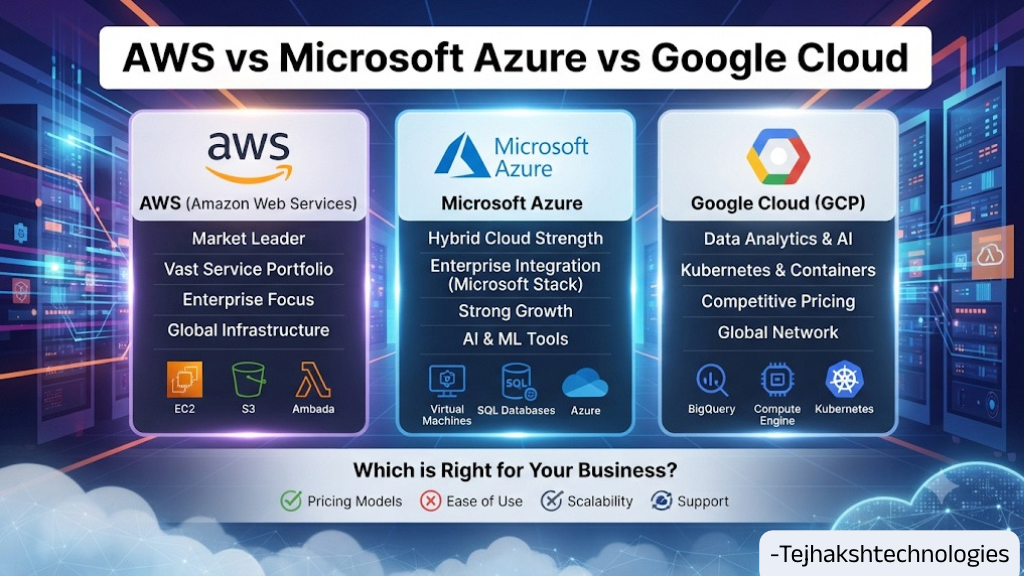
AWS stands out for its extensive service portfolio, flexible infrastructure, and broad ecosystem. Microsoft Azure is particularly valuable for businesses that depend on Microsoft technologies and hybrid cloud environments. Google Cloud is an attractive option for organizations working with data analytics, Kubernetes, and AI-driven applications.
There is no single platform that can be called the best for every business.
Before making a decision, evaluate your technical requirements, estimate the total infrastructure cost, review security needs, and test the services that matter most to your organization.
A well-planned cloud strategy can help businesses improve operational efficiency, support future growth, and build a reliable digital infrastructure.
Ultimately, the best cloud platform is the one that fits your business goals today while providing enough flexibility for tomorrow.
Frequently Asked Questions (FAQs)
1. Which is better: AWS, Azure, or Google Cloud?
All three platforms offer powerful cloud computing services. AWS is known for its extensive service portfolio, Azure for Microsoft integration and hybrid cloud capabilities, and Google Cloud for analytics, Kubernetes, and AI. The best choice depends on your business requirements.
2. Is AWS cheaper than Microsoft Azure?
Not necessarily. Pricing depends on computing resources, storage, geographical regions, network usage, licensing, and available discounts. Comparing the cost of your actual workload is the best way to determine which provider is more affordable.
3. Is Google Cloud better than AWS?
Google Cloud can be a suitable choice for data analytics, Kubernetes, and AI-focused workloads. AWS offers a broad range of cloud infrastructure and application services. The better platform depends on your project requirements.
4. Which cloud platform is best for beginners?
AWS, Microsoft Azure, and Google Cloud all provide learning materials, training programs, and foundational certifications. Beginners can start with any platform based on their career interests and preferred technology ecosystem.
5. Which cloud platform is best for startups?
All three providers support startups. AWS offers flexible infrastructure, Azure is suitable for startups using Microsoft technologies, and Google Cloud can be attractive for businesses developing data-driven and AI-based products.
6. Can a business use AWS, Azure, and Google Cloud together?
Yes. This approach is known as a multi-cloud strategy. Businesses can use services from multiple providers, but they must carefully manage networking, security, data movement, billing, and technical operations.
7. What is the main difference between AWS and Google Cloud?
AWS is Amazon’s cloud platform, while Google Cloud is Google’s cloud computing ecosystem. Both offer virtual machines, storage, databases, networking, analytics, and AI services, but their tools and technology ecosystems differ.
8. Is cloud computing useful for small businesses?
Yes. Cloud computing can reduce upfront infrastructure expenses, provide flexible resources, improve backup capabilities, and give small businesses access to modern technology without maintaining their own data centers.
9. Which cloud platform is best for website hosting?
AWS, Azure, and Google Cloud can all host websites and web applications. The right choice depends on website traffic, application requirements, budget, technical knowledge, and expected growth.
10. Which cloud platform should developers learn in 2026?
Developers can learn any of these platforms depending on their career goals. AWS is valuable for cloud infrastructure, Azure is useful in Microsoft-based enterprise environments, and Google Cloud is relevant to data analytics, Kubernetes, and AI development.

Leave a Comment