

- July 27, 2026
- Tejhaksh
- 0 Comments
- Development, Software Development, Uncategorized
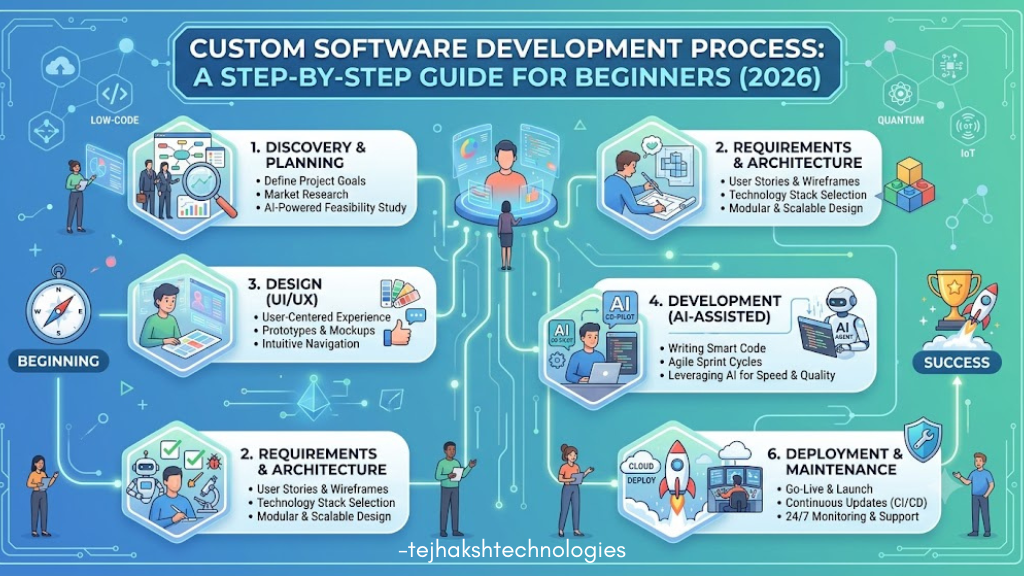
Custom Software Development Process: A Step-by-Step Guide for Beginners (2026)
In today’s digital world, many businesses rely on off-the-shelf software to manage their daily operations. While these tools are quick to set up, they often come with unnecessary features, limited customization, and recurring subscription costs. As businesses grow, these limitations can reduce productivity and make it harder to meet specific business needs.
Custom software development offers a smarter solution. It allows businesses to build software that is designed specifically for their workflows, goals, and operational requirements. Instead of adapting your business to fit the software, custom software is built to fit your business.
Whether you’re a startup launching a new product, a small business improving operations, or a large enterprise looking to automate complex processes, understanding the custom software development process is essential. In this beginner-friendly guide, you’ll learn what custom software is, how it’s developed, its key benefits, best practices, and the common mistakes to avoid in 2026.
What Is Custom Software?
Custom software is software that is specially designed and developed to meet the unique needs of a specific business or organization. Unlike off-the-shelf software, which is built for a wide range of users, custom software is tailored to match your workflows, business processes, and goals.
For example, a hospital may need a patient management system, a retail store may require custom inventory software, or a logistics company may need a shipment tracking platform. These solutions are built specifically for the business, making them more efficient and easier to use.
Because custom software is created around your requirements, it offers greater flexibility, better security, easier integration with existing systems, and the ability to scale as your business grows. Although it may require a higher initial investment, it often provides better long-term value by improving productivity and reducing the need for multiple software subscriptions.
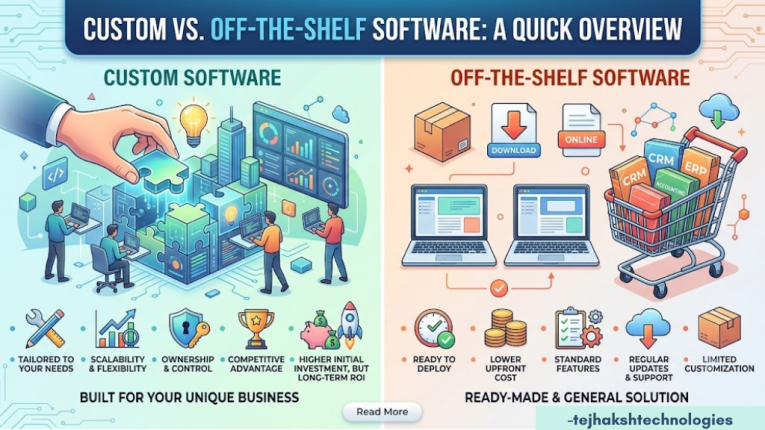
Custom vs. Off-the-Shelf Software: A Quick Overview
Before diving into the software development process, it’s important to understand why many businesses prefer custom software over off-the-shelf (SaaS) solutions. Here’s a simple comparison:
1. Tailored to Your Business Needs
Custom Software: Designed specifically for your organization’s workflows, goals, and business requirements.
Off-the-Shelf Software: Built for a broad audience with standard features that may not fully meet your unique needs.
2. Ownership and Control
Custom Software: You own the source code, intellectual property (IP), and have complete control over future updates and enhancements.
Off-the-Shelf Software: You only purchase or subscribe to a license to use the software, while the vendor retains ownership and control.
3. Scalability and Flexibility
Custom Software: Easily adapts as your business grows, allowing you to add new features and expand functionality whenever needed.
Off-the-Shelf Software: Limited by the vendor’s update schedule, feature roadmap, and subscription plans.
4. Cost Structure
Custom Software: Requires a higher upfront investment but can reduce long-term costs by eliminating recurring licensing fees and unnecessary features.
Off-the-Shelf Software: Lower initial cost, but monthly or annual subscription fees can become expensive over time.
5. Integration with Existing Systems
Custom Software: Can be seamlessly integrated with your existing business applications, databases, and internal systems.
Off-the-Shelf Software: Integration options depend on the vendor’s available APIs, plugins, or third-party connectors, which may have limitations.
6. Customization
Custom Software: Every feature can be built and modified according to your specific business requirements.
Off-the-Shelf Software: Customization is usually limited to the options provided by the software vendor.
7. Security
Custom Software: Security measures can be tailored to your organization’s compliance requirements and specific security policies.
Off-the-Shelf Software: Uses standardized security features that are shared across all customers, making them a more common target for attackers.
8. Maintenance and Updates
Custom Software: You decide when and how updates are implemented, giving you complete control over maintenance.
Off-the-Shelf Software: Updates are managed by the vendor and may introduce changes that don’t align with your business needs.
9. Competitive Advantage
Custom Software: Provides unique features and workflows that can help differentiate your business from competitors.
Off-the-Shelf Software: Since it’s widely available, competitors may be using the same software and features.
10. Long-Term Value
Custom Software: Offers greater return on investment (ROI) over time by improving efficiency and supporting business growth.
Off-the-Shelf Software: Suitable for general-purpose needs but may require additional tools or upgrades as your business expands.
What Defines Modern Software Development in 2026?
Software development has changed a lot over the past few years. In 2026, businesses focus on creating software that is faster, smarter, more secure, and easier to scale. Here are the key trends shaping modern software development:
1. AI-Assisted Development
Artificial Intelligence (AI) helps developers write code faster, detect bugs early, automate testing, and improve software quality. This allows development teams to spend more time on solving business problems and creating a better user experience.
2. Cloud-Native and Microservices Architecture
Modern software is built using cloud technology and microservices, where applications are divided into smaller, independent components. This makes software easier to update, maintain, and scale as business needs grow.
3. Security by Design
Security is no longer an afterthought. Modern software is designed with strong security measures from the beginning to protect user data, prevent cyber threats, and reduce security risks.
4. Regulatory Compliance
Businesses must follow data privacy and security regulations, such as GDPR and other industry standards. Modern software is developed to meet these compliance requirements from the start, helping organizations avoid legal and financial issues.
5. User-Centered Design
Today’s software is built with users in mind. Developers focus on creating simple, fast, and intuitive interfaces that improve customer satisfaction and make applications easy to use.
6. Scalability and Flexibility
Modern software is designed to adapt and grow with your business needs. As your users, data, or business requirements increase, the software can be expanded without major changes or disruptions.
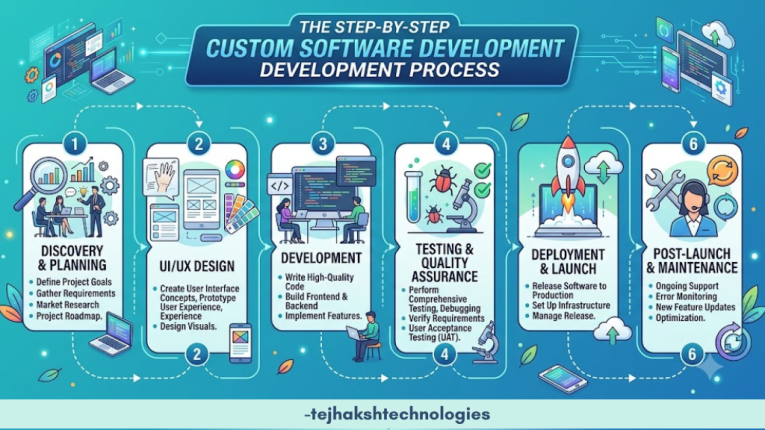
The Step-by-Step Custom Software Development Process
A structured process ensures projects stay on schedule, remain within budget, and deliver tangible business value. Here is how a custom software project progresses from concept to completion.
Step 1: Discovery, Requirements Gathering & Feasibility Analysis
Every successful software project starts with detailed research. The goal of the discovery phase is to clearly articulate the problem the application will solve and define measurable success metrics.
Key Activities:
- Stakeholder Interviews: Engage key end-users and team leaders to map out daily pain points, target features, and essential workflows.
- Technical Feasibility Analysis: Evaluate existing data structures, third-party software integrations, and technical constraints.
- Defining Scope & Deliverables: Draft a Software Requirement Specification (SRS) document outlining project goals, functional requirements, and milestone timelines.
Deliverables: Detailed Software Requirement Specification (SRS) document, competitive analysis report, high-level project roadmap, and preliminary budget estimate.
Step 2: UI/UX Design & Prototyping
Software must be intuitive, efficient, and visually clear for users to adopt it effectively. Design involves two primary steps: User Experience (UX) (how it works) and User Interface (UI) (how it looks).
Key Activities:
- User Flow Diagrams: Map out how users will navigate between screens to complete tasks.
- Wireframing: Create basic structural layouts of individual screens without complex visual styling.
- Interactive Prototyping: Build interactive clickable prototypes that simulate real user interactions. This allows teams to test features before writing code.
- Design Systems: Establish reusable UI kits, typography rules, color palettes, and component libraries.
Deliverables: Clickable high-fidelity prototype, screen mockups, and comprehensive UI design system.
Step 3: Architecture & Tech Stack Selection
System architecture serves as the structural foundation of your software. Choosing the right technology stack ensures the application handles growth seamlessly, remains secure, and runs smoothly.
Tech Stack Components:
- Frontend (User-facing): Modern client frameworks such as React, Vue.js, Angular, or Flutter (for mobile).
- Backend (Server-side logic): Scalable technologies including Node.js, Python, Go, or Java.
- Databases: PostgreSQL, MongoDB, or Redis depending on structured vs. un-structured data requirements.
- Cloud Infrastructure: Cloud hosting platforms like AWS, Microsoft Azure, or Google Cloud Platform (GCP).
USER INTERFACE
React / Vue.js / Flutter (Mobile)
│
▼
BACKEND LOGIC
Node.js / Python / REST & GraphQL APIs
│
▼
DATABASE & CLOUD
PostgreSQL / MongoDB / AWS Cloud Infrastructure
Deliverables: System Architecture Diagram, Database Schema Design, and Final Tech Stack Documentation.
Also read this:
What Is Web Hosting? Everything You Need to Know (2026)
Hadoop Distributed File System (HDFS): Architecture, Working, Advantages & Complete Guide
Core Web Vitals Guide 2026: Improve Website Speed & Google Rankings
What is Hyperautomation? Complete Guide with Benefits, Use Cases, Challenges & Implementation
Step 4: Agile Development & Sprint Execution
During development, engineers write the code that powers the user interface, server logic, and integrations. Most modern software teams use Agile methodologies (such as Scrum).
Rather than attempting to build the entire product at once, work is broken down into Sprints—short 2-week iterations focused on completing specific features.
Typical Sprint Cycle:
- Sprint Planning: Select tasks from the project backlog for the upcoming cycle.
- Daily Standup: Quick daily check-in meetings to discuss progress, goals, and potential blockers.
- Sprint Review & Demo: Demonstrate functional software increments to project stakeholders for early feedback.
- Sprint Retrospective: Review what worked well and refine processes for the next cycle.
Deliverables: Functional, tested code increments released at the end of each sprint cycle.
Step 5: Quality Assurance (QA) & Security Testing
Before the software is launched, it goes through a thorough testing process to ensure it is reliable, secure, and performs smoothly. Quality Assurance (QA) helps identify and fix issues early, ensuring users have a seamless experience.
Types of Essential Testing:
- Functional Testing: Verifies that every feature operates according to functional specifications.
- Integration Testing: Confirms that application modules and external third-party APIs work together seamlessly.
- Performance & Load Testing: Tests application speed and stability under heavy user traffic.
- Security & Vulnerability Scans: Audits code against modern vulnerabilities, data leaks, and compliance standards.
- User Acceptance Testing (UAT): Real users test the system in a controlled environment to verify it solves business needs before live deployment.
Deliverables: QA Test Reports, Bug Fix Verification Logs, and Final UAT Sign-off.
Step 6: Deployment, CI/CD, & Data Migration
After the software has been fully tested and approved, it is ready to be launched in the live (production) environment. This stage ensures the application is accessible to users and runs smoothly from day one.
Key Deployment Tasks:
- CI/CD Pipelines: Set up Continuous Integration / Continuous Deployment automation pipelines to streamline future updates without manual server restarts.
- Server Infrastructure Setup: Configure production cloud environments, domain name routing, and security SSL certificates.
- Data Migration: Clean, format, and import existing data into the new application database.
- User Onboarding: Provide documentation, video tutorials, and live training sessions to ease user adoption.
Deliverables: Production environment launch, live database, and user onboarding documentation.
Step 7: Post-Launch Support & Continuous Enhancement
Launching the software is just the beginning. To keep it secure, reliable, and up to date, regular maintenance and continuous improvements are essential. Ongoing support helps ensure the software continues to meet changing business needs and delivers the best user experience.
Ongoing Activities:
- System Health Monitoring: Monitor server response times, system uptime, and error logs in real-time.
- Security Updates: Apply regular security patches, framework updates, and dependency maintenance.
- Iterative Feature Additions: Collect feedback from real end-users to prioritize future functional enhancements.
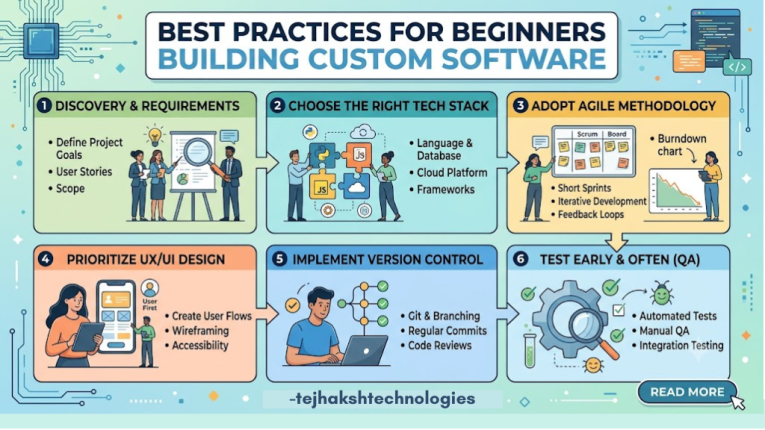
Best Practices for Beginners Building Custom Software
Building custom software is a business investment. To maximize your return and manage costs, keep these tips in mind:
1. Start with a Minimum Viable Product (MVP)
Avoid building every ideal feature in version 1.0. Launch with a Minimum Viable Product (MVP)—a streamlined version focused on core functionalities. This helps you gather user feedback faster and refine features based on real usage patterns.
2. Prioritize Data Security Early
Retrofitting security features into an existing application is expensive and complex. Ensure encryption, access controls, and data protection mechanisms are integrated into system design from day one.
3. Maintain Clear Documentation
Ensure your development team maintains clear codebase documentation, API descriptions, and setup guidelines. Good documentation protects your business and makes long-term updates simpler.
4. Choose Modular Architectures
Using API-first and microservices-based approaches makes it easier to update, expand, or refactor individual parts of your application without breaking the rest of the system.
Conclusion
Custom software development helps businesses create solutions that are built specifically for their unique needs. Unlike off-the-shelf software, it gives you full control over features, security, scalability, and future updates.
By following a well-planned development process—from understanding business requirements and designing the software to development, testing, deployment, and ongoing maintenance—you can build a reliable, secure, and scalable solution that supports long-term business growth. Investing in custom software today can improve efficiency, enhance customer experiences, and give your business a strong competitive advantage in the future.
Leave a Comment