


- June 19, 2026
- Tejhaksh
- 0 Comments
- Hadoop Distributed File System, Uncategorized
Hadoop Distributed File System (HDFS): Architecture, Working, Advantages & Complete Guide
Introduction
In the modern digital world, enormous volumes of data are created every day. Social media, online shopping websites, banking services, mobile apps, and other digital platforms continuously produce data. Securely storing and rapidly processing this massive volume of data can pose a significant challenge for any organization.
The Hadoop Distributed File System (HDFS) offers a solution to this problem. HDFS is a crucial component of the Hadoop ecosystem, developed to securely store and manage large-scale data across multiple computers. It enables easy storage, access, and processing of data, regardless of the volume.
In the realm of Big Data, HDFS is regarded as a reliable, scalable, and fault-tolerant storage system. The system maintains multiple copies of data, ensuring that the data remains safe even if a single machine fails.
In this article, we will explore key aspects of HDFS—such as its definition, history, architecture, working mechanism, benefits, installation process, and methods for storage and file access—in simple, easy-to-understand language.
What is HDFS (Hadoop Distributed File System)?
HDFS (Hadoop Distributed File System) is a crucial storage system within the Hadoop platform, designed to store vast amounts of data securely, systematically, and efficiently. It is a key component of big data technology and is utilized by large organizations worldwide for data storage and processing.
In traditional storage systems, data is typically stored on a single server or computer; in contrast, HDFS divides data into smaller chunks and stores them across multiple computers (nodes). This enables the system to easily handle even the largest files and datasets.
A standout feature of HDFS is its fault tolerance capability. If a technical issue arises in a specific server or node, other copies of the data remain available, ensuring data safety and allowing the system to continue operating without interruption.
Due to its high scalability, reliability, and cost-effective architecture, HDFS is widely used today in fields such as big data storage, data analytics, machine learning, and cloud computing.
Key Features of HDFS
- Capacity to store data on a massive scale
- High scalability
- Fault tolerance
- Fast data processing
- Reliable and secure data storage
- Cost-effective management of large datasets
Where is HDFS used?
HDFS is utilized in sectors where massive volumes of data are generated and processed, such as:
- Banking and financial services
- Healthcare and medical research
- Telecom companies
- E-commerce websites
- Social media platforms
- Government institutions
- Data analytics and machine learning
HDFS stores data by breaking it down into smaller blocks and distributing them across multiple machines. If a server encounters an issue, other copies of the data remain available, ensuring the data stays secure and accessible at all times.
For these reasons, HDFS is regarded as the backbone of the Hadoop ecosystem and the most reliable solution for Big Data storage.
History of HDFS (Hadoop Distributed File System)
HDFS was developed to address the growing need to store and process data on a massive scale. It originated from the concept of the Google File System (GFS), which Google had developed to handle vast amounts of data.
In 2003, Google published a research paper on GFS. Inspired by this technology, Doug Cutting and Mike Cafarella initiated the Hadoop project and developed a powerful distributed storage system, which is known today as HDFS (Hadoop Distributed File System).
Later, Hadoop was developed under the Apache Software Foundation and became a popular open-source big data platform. Over time, numerous improvements were made to HDFS, establishing it as one of the world’s most reliable systems for storing and managing big data.
Key Timeline of HDFS Development
- 2003: Google published a research paper on the Google File System (GFS).
- 2004: Development of the Hadoop project began.
- 2006: Hadoop received support from the Apache Software Foundation.
- 2008: Hadoop became a Top-Level Apache Project.
- Present Day: HDFS is widely used across the globe for big data storage, data analytics, and cloud-based data processing.
Today, HDFS is considered one of the most significant achievements in big data technology, enabling large companies and organizations to handle massive datasets securely, quickly, and efficiently.
What is the role of HDFS in Big Data?
In the world of Big Data, HDFS (Hadoop Distributed File System) serves as a robust and reliable storage system. When an organization deals with massive volumes of data, securely storing and rapidly processing it becomes a major challenge. HDFS provides a solution to this very problem.
Big Data is typically understood through the “5Vs”:
- Volume: Massive amounts of data
- Velocity: Data generated at high speed
- Variety: Diverse types of data
- Veracity: Data quality and accuracy
- Value: Deriving useful insights from data
Traditional storage systems often prove inadequate for handling such large and complex data. In contrast, HDFS has been specifically developed to store and manage data on a massive scale.
Key benefits of HDFS in Big Data:
- Easily stores large volumes of data.
- Keeps data secure by distributing it across multiple servers.
- Supports fast and efficient data processing.
- Ensures data security by creating multiple copies (replication).
- Provides large-scale storage solutions at a low cost.
- Supports distributed computing.
Key Big Data technologies used with HDFS
HDFS works in conjunction with several popular Big Data tools and frameworks, such as:
- Apache Spark
- Apache Hive
- Apache Pig
- Apache HBase
- Apache Flume
- Apache Kafka
Due to these features, HDFS is considered the backbone of the Big Data ecosystem. It enables organizations to securely store and process vast amounts of data and derive valuable insights from it.
HDFS Architecture
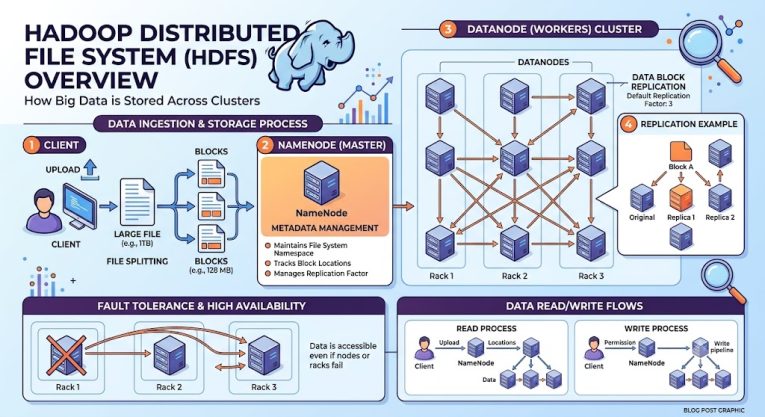
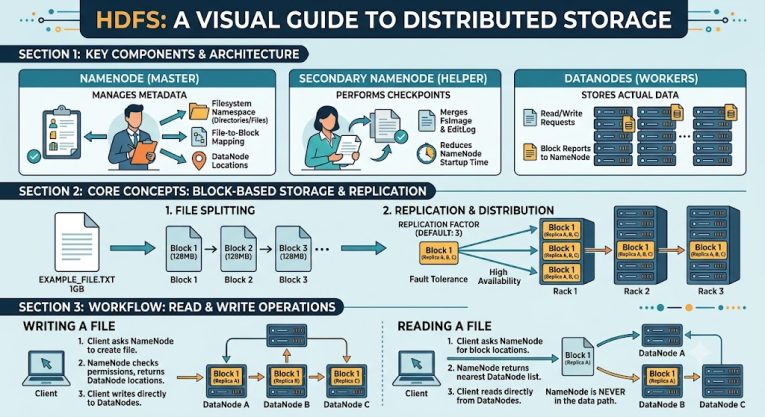
The HDFS architecture is primarily based on two key components: the NameNode and the DataNode. Together, they handle the storage, management, and access of data.
1. NameNode
The NameNode is the master server of HDFS. It controls and manages the entire file system. The NameNode maintains information regarding where files are stored and which DataNode holds specific data.
Key functions of the NameNode:
- Managing file and folder information (metadata)
- Tracking the location of data blocks
- Managing file permissions and access controls
- Managing the directory structure
Note: The NameNode stores information about the data but does not store the actual data itself.
2. DataNode
DataNodes are the worker nodes in HDFS where the actual data is stored. When a file is saved in HDFS, it is split into smaller blocks and distributed across various DataNodes.
Key functions of the DataNode:
- Storing data blocks
- Reading and writing data
- Sending regular status reports to the NameNode
- Maintaining additional copies (replicas) of data
A Hadoop cluster can contain multiple DataNodes that work together to store large volumes of data securely and efficiently.
Why is HDFS Architecture important?
This NameNode and DataNode structure makes HDFS fast, secure, and fault-tolerant. If a DataNode fails, the information remains safe due to the existence of other data copies, allowing the system to continue operating without interruption.
How Does HDFS Work?
HDFS is a distributed storage system that securely stores large amounts of data by splitting it across multiple computers. It enables fast storage, management, and access to data. Let’s understand how HDFS works in simple terms.
Step 1: Splitting the file into blocks
When a user uploads a file to HDFS, the system divides that file into smaller data blocks. This makes it easier to store and process large files.
Step 2: Storing data across different DataNodes
Once the file is split into blocks, HDFS stores them across various DataNodes. This distributes the storage load across multiple machines, allowing the system to operate more efficiently.
Step 3: Creating data copies (Replication)
To ensure data safety, HDFS creates multiple copies of each block and stores them on different DataNodes. This process is known as Replication.
Typically, the default replication factor in HDFS is 3, meaning three copies of every data block are created.
Step 4: Managing information via the NameNode
The NameNode manages the system’s metadata (information about the data), such as:
File name
File storage location
Block locations
User permissions and access details
This information helps in easily locating and managing the data.
Step 5: Accessing the file
When a user requests to open or download a file, the NameNode provides information about the relevant DataNodes. The data blocks are then retrieved from these DataNodes and reassembled to make the complete file available to the user.
Why is HDFS reliable?
Even if a DataNode fails, other copies of the data remain available. For this reason, HDFS is considered a fault-tolerant and reliable storage system capable of securely handling large-scale data.
What is HDFS Storage?
HDFS Storage is a distributed storage system within Hadoop, used to store vast amounts of data securely and systematically. Instead of keeping data on a single server, it splits and stores data across multiple computers (DataNodes), making data management easier and more secure.
Key Features of HDFS Storage
1. Block-Based Storage
HDFS stores large files by dividing them into smaller blocks. This allows for faster data processing and management.
Typically, the block size in HDFS is:
128 MB
256 MB
2. Data Replication
HDFS creates multiple copies of each data block and stores them across different DataNodes. This ensures data remains safe even if a server fails.
3. High Scalability
As the volume of data grows, storage capacity can be easily increased by adding new DataNodes. This makes HDFS an ideal solution for large organizations.
4. Fault Tolerance
Even if a machine or hardware component malfunctions, other copies of the data remain available. This significantly minimizes the risk of data loss.
Where is HDFS Storage Used?
HDFS is used in areas requiring the storage and analysis of massive datasets, such as:
- Data Warehousing
- Machine Learning
- Data Lakes
- Log Analytics
- Business Intelligence
- Big Data Analytics
Due to its scalability, security, and reliability, HDFS is considered one of the most popular and effective solutions for Big Data storage today.
Also read this:
What Is Big Data Technology? Types, Tools, Benefits & Future Trends Explained
Best AI Tools for Digital Marketing 2026: Smarter Strategies for Faster Growth
What is Microsoft SQL Server? Features, History, Uses & Versions Explained
What is a URL Slug? Why They Matter for SEO and How to Optimize Them
Benefits of Hadoop Distributed File System (HDFS)
HDFS is one of the most popular storage systems for storing and managing big data. Its various features make it an excellent choice for large organizations and data-driven applications.
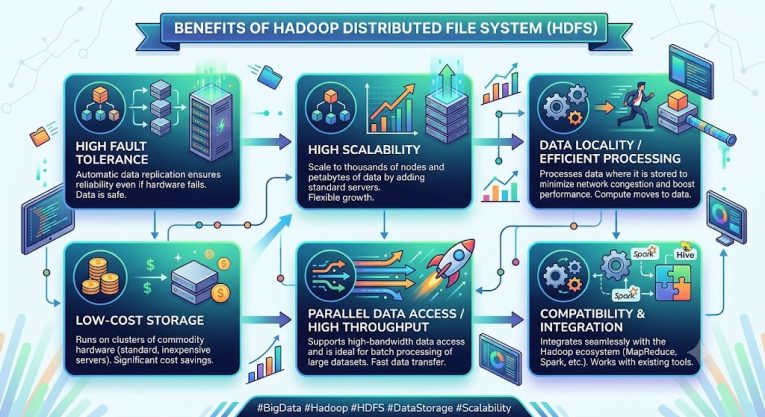
1. Fault Tolerance
HDFS stores multiple copies of data across different servers. If a server fails, the data remains safe and easily accessible.
2. High Scalability
As data grows, storage capacity can be easily increased by adding new DataNodes to HDFS. This does not require replacing the entire system.
3. Fast Data Processing
HDFS is designed for fast and efficient performance with large datasets, thereby increasing data processing speed.
4. Cost-effective Solution
It can operate on commodity hardware, which reduces the cost of building large storage systems.
5. High Reliability
HDFS includes features like automatic data recovery and backup, ensuring data remains secure and available.
6. Support for Distributed Processing
HDFS integrates seamlessly with technologies like Hadoop MapReduce and Apache Spark, making big data analysis more effective.
7. Support for Various Data Types
HDFS can store structured, semi-structured, and unstructured data, making it useful across various industries.
8. Ideal for Big Data
Due to its ability to store vast amounts of data securely, quickly, and cost-effectively, HDFS is considered the most suitable storage system for big data environments.
Thanks to these features, HDFS is widely used today in data analytics, machine learning, cloud computing, and big data projects.
It can operate on commondity hardware, which reduces the cost of building large storage systems
How to Install HDFS?
To install HDFS, you need to set up Hadoop and perform certain necessary configurations. You can set up HDFS by following the simple steps outlined below.
Step 1: Install Java
Java must be installed on your system to run Hadoop and HDFS.
Run the following command in the terminal to verify that Java is installed:
java -version
If the Java version is displayed, it means Java is successfully installed.
Step 2: Download Hadoop
Now, download the latest version of Hadoop from the official Apache Hadoop website and install it on your system.
Step 3: Set Environment Variables
To run Hadoop correctly, you need to configure certain environment variables, such as:
JAVA_HOME
HADOOP_HOME
These variables inform the system about the locations of Java and Hadoop.
Step 4: Update Hadoop Configuration Files
To make HDFS operational, you need to make necessary changes to some key Hadoop configuration files:
core-site.xml
hdfs-site.xml
mapred-site.xml
yarn-site.xml
Storage locations, network settings, and other essential configurations are defined in these files.
Step 5: Format the NameNode
It is necessary to format the NameNode before starting HDFS. Run the following command to do this:
hdfs namenode -format
This command prepares the initial structure of HDFS.
Step 6: Start HDFS
Now, use the following command to start the HDFS services:
start-dfs.sh
This will start the NameNode and DataNode services.
Step 7: Verify the Installation
Run the command below to ensure that HDFS is running correctly:
jps
If the installation is successful, you will see the NameNode, DataNode, and other Hadoop processes listed.
How to Use HDFS?
To interact with files stored in HDFS, users commonly use the Command-Line Interface (CLI). It provides an easy way to handle file operations, including transferring, accessing, copying, and removing data from the distributed file system.
Below are some important commands used in HDFS:
1. Upload a file
To upload a file from your local system to HDFS:
hdfs dfs -put sample.txt /mydata
By executing this command, the sample.txt file will be copied from the local system and saved in the /mydata folder of HDFS.
2. Download a file
To download a file from HDFS to your computer:
hdfs dfs -get /mydata/sample.txt
This command will copy the file from HDFS to your local system.
3. View file contents
If you want to view the data contained within a file, use this command:
hdfs dfs -cat /mydata/sample.txt
4. Delete a file
To delete a file from HDFS:
hdfs dfs -rm /mydata/sample.txt
5. Copy a file
To copy a file from one location to another:
hdfs dfs -cp source destination
Why are HDFS commands important?
With the help of these basic commands, you can easily manage files in HDFS. Tasks such as uploading, downloading, copying, and deleting data are performed daily in Big Data projects. Therefore, it is essential for anyone working with HDFS to be familiar with these commands.
How to Access HDFS Files?
Files stored in HDFS can be accessed in several different ways. Users can choose the appropriate method based on their requirements and technical expertise.
1. Command Line Interface (CLI)
The Command Line Interface (CLI) is the most common and popular method for accessing HDFS files. It allows users to upload, download, copy, move, and manage files.
This method is most frequently used by system administrators and data engineers.
2. Web User Interface (Web UI)
HDFS also provides a web-based dashboard that allows users to view system information via a browser.
The default address for the HDFS Web UI is:
http://localhost:9870
This dashboard displays the status of the NameNode, storage usage, DataNode information, and other important details.
3. Via APIs
Developers can use various APIs to connect their applications to HDFS.
Popular APIs include:
- Java API
- Python API
- REST API
These APIs make it easy to read, write, and manage data in HDFS programmatically.
4. Via Big Data Tools
Many popular big data tools integrate directly with HDFS and can utilize the data stored within it.
Key examples include:
- Apache Hive
- Apache Spark
- Apache HBase
- Apache Pig
These tools assist in the analysis, processing, and reporting of big data.
Conclusion
The Hadoop Distributed File System (HDFS) is one of the most important and popular storage systems in the world of big data. It is a core component of the Hadoop ecosystem, facilitating the storage of vast amounts of data in a secure, organized, and efficient manner.
Key features of HDFS—such as scalability, fault tolerance, high performance, and cost-effectiveness—make it an ideal choice for big data projects. It enables organizations to securely store data across multiple servers and easily expand storage capacity as needed.
If you aspire to work in fields like big data, data analytics, machine learning, or cloud computing, having a fundamental understanding of HDFS is crucial. Comprehending how HDFS works, its architecture, and the processes of data storage and usage is a significant step toward mastering modern data technologies.
In the rapidly evolving digital era, where massive volumes of data are generated daily, HDFS will continue to play a vital role as a reliable, secure, and scalable storage solution.
Leave a Comment