
Tejhaksh Technologies is the Website designing & Digital Marketing company based in Neemuch, established in 2020 providing Website design, Website development, Logo design, Domain Registration, Web hosting, Android App Development, eCommerce web development, Search Engine Optimization, Bulk SMS etc. We have good experience in developing different platform websites and we keep our eye on the latest technologies to implement on the website for better conversion and user experience.
In the modern business environment, organizations collect vast amounts of data from multiple sources every day. However, collecting data alone isn’t enough. Organizations need the ability to transform raw data into meaningful insights that drive smarter decisions. This is where Microsoft Power BI becomes one of the most powerful Business Intelligence (BI) tools available.
Power BI enables businesses to connect multiple data sources, create interactive dashboards, visualize key performance indicators (KPIs), and generate real-time reports. Whether you’re a startup, small business, or large enterprise, Power BI helps you understand your data and make informed business decisions faster.
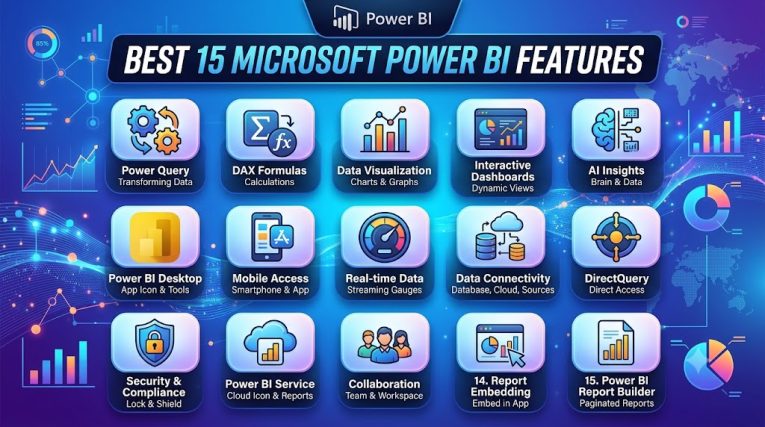
In this blog, we’ll explore the Top 15 Power BI Features Every Business Should Know and explain how these capabilities can improve productivity, efficiency, and profitability.
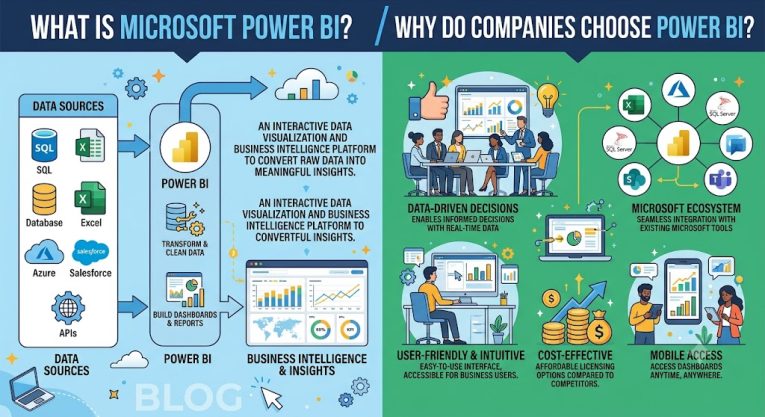
Microsoft Power BI is a Business Intelligence (BI) and data visualization tool developed by Microsoft. It allows you to consolidate data from various sources (such as Excel, SQL Server, Google Analytics, SharePoint, etc.) into a single location, analyze it, and visualize it through engaging charts, graphs, dashboards, and reports.
The primary objective of Power BI is to make large and complex datasets easy to understand, enabling companies to make informed, data-driven decisions at the right time. Its interactive reports and real-time dashboards help users easily grasp the current state of the business, its performance, and future trends.
In simple terms:
Power BI is a smart tool that transforms scattered data into actionable insights. It enables you to view your business performance on a single dashboard, generate reports, and make better, faster decisions.
Microsoft Power BI consists of several key components that work together to simplify data analysis, report creation, and sharing. Let’s understand them in simple terms.
1. Power BI Desktop
Power BI Desktop is a free Windows application used to connect to data from various sources, clean and organize it, create reports, and design dashboard interactives. If you want to start working with Power BI, this is the primary tool to begin with.
2. Power BI Service
Power BI Service is Microsoft’s cloud-based platform. It allows you to publish reports and dashboards created in Power BI Desktop online, share them with your team, and access them from anywhere. It is highly useful for team collaboration.
3. Power BI Mobile
The Power BI Mobile App is available for both Android and iOS. It enables you to view reports and dashboards on your mobile or tablet anytime, anywhere, ensuring that critical business information is always within reach.
4. Power BI Report Server
Power BI Report Server is designed for companies that prefer to keep their data secure on their own servers (on-premises) rather than on the cloud. It allows organizations to maintain full control over their reports and data.
In today’s world, data is a business’s greatest asset. However, merely possessing data is not enough; understanding it correctly and making decisions based on it is crucial. Microsoft Power BI simplifies this process. That is why millions of companies worldwide use Power BI for their data analytics and business reporting needs.
Several key features contribute to Power BI’s popularity, such as:
Whether your business operates in sales, finance, marketing, HR, healthcare, manufacturing, education, or retail, Power BI enables you to analyze your data in depth and make better, faster, and more accurate business decisions.
One of Power BI’s standout features is its interactive dashboard. It allows you to view your entire business dataset on a single screen with ease. Compared to standard reports, Power BI dashboards are smarter and more user-friendly, making data comprehension and analysis significantly simpler.
With Power BI’s interactive dashboards, you can:
This enables managers, business owners, and decision-makers to understand the state of their business and make informed decisions quickly, without having to wade through lengthy reports.
Key Benefits
One of Power BI’s greatest strengths is its ability to easily connect to a wide range of data sources. You can integrate data from numerous sources such as Excel, SQL Server, Azure, SharePoint, Google Analytics, Salesforce, Oracle, SAP, MySQL, PostgreSQL, CSV files, and APIs.
This allows data from disparate locations to be consolidated onto a single central dashboard, simplifying data analysis and reducing manual effort.
Key benefits:
With Power BI, you can easily monitor real-time data. Its live dashboards automatically update, ensuring you always have access to the latest information.
You can instantly track critical data—such as sales, inventory, website traffic, production, customer service, and finance—and make informed decisions in a timely manner.
Key Benefits:
Power BI transforms complex data into engaging, easy-to-understand charts and graphs. It offers a wide range of visuals—such as bar charts, pie charts, line graphs, KPI cards, maps, heat maps, and funnel charts—that make data easy to interpret.
Key Benefits:
Analyzing data becomes even easier in Power BI with the help of Artificial Intelligence (AI). It automatically identifies trends, patterns, and key information hidden within the data to provide actionable insights.
It offers AI features such as Trend Analysis, Forecasting, Anomaly Detection, Smart Narrative, and Key Influencers Analysis.
Key Benefits:
Power BI’s drag-and-drop report builder makes creating reports incredibly easy. It requires no coding whatsoever; simply select your data, add charts or visuals, and generate professional reports in minutes.
This feature is particularly useful for beginners and non-technical users.
Key Benefits:
In Power BI, you can generate reports and charts instantly by simply asking questions in plain language. There is no need for complex filtering or coding.
Examples:
Power BI understands your question and automatically generates the appropriate chart or report. This feature is particularly useful for new and non-technical users.
Key Benefits:
Power BI enables you to create accurate and organized data models by integrating multiple data sources. It allows you to establish relationships between data and create new calculated columns and measures, resulting in more accurate and useful reports.
Key Benefits:
DAX (Data Analysis Expressions) is a powerful formula language in Power BI that enables you to perform custom calculations and advanced data analysis. It allows you to create custom formulas tailored to your needs, thereby enhancing the accuracy of your reports.
With DAX, you can easily calculate metrics such as Running Totals, Profit Margins, Percentages, Year-over-Year (YoY) Growth, and other key business indicators.
Key Benefits:
Power BI reports and dashboards can be easily viewed across all devices—mobiles, tablets, and laptops. Their design automatically adjusts to the screen size, allowing you to access your business data anytime, anywhere.
This feature allows users to access business reports anytime, anywhere.
Key Benefits:
Power BI provides enterprise-grade security to safeguard your data and reports. It offers the ability to grant access to users based on their roles, ensuring that only authorized individuals can view sensitive information.
Power BI includes security features such as Role-Based Access, Row-Level Security, Data Encryption, and Workspace Permissions.
Key Benefits:
In Power BI, you can automate data refreshing, ensuring reports update automatically at scheduled times. You do not need to update the data manually every time.
You can schedule data refreshes to occur hourly, daily, weekly, or monthly.
Key Benefits:
Power BI integrates seamlessly with popular Microsoft 365 tools such as Excel, Microsoft Teams, SharePoint, OneDrive, Azure, and Outlook. This makes sharing data, collaborating on reports, and working together as a team very easy.
Key Benefits:
Power BI offers a wide range of custom visuals that allow you to present your data in a more engaging and impactful way. These include visuals such as Gantt Charts, Sankey Diagrams, Bullet Charts, Word Clouds, Timeline Charts, and Advanced Maps.
These custom visuals simplify complex data and make it easier to understand, resulting in more effective reports.
Key Benefits:
Power BI is a cloud-based platform that allows you to access your reports and dashboards from anywhere, at any time, via the internet. This makes it easy to share reports with your team and collaborate in real-time.
This feature is highly beneficial for remote and hybrid teams.
Key Benefits:
Microsoft is continuously adding new features and modern technologies to Power BI. Thanks to capabilities such as AI (Artificial Intelligence), enhanced data visualization, cloud integration, and automation, Power BI is becoming increasingly smarter and more useful.
Today, most companies are prioritizing data-driven decision-making. Consequently, the demand for and usage of Power BI are likely to grow rapidly in the near future.
Businesses that start using Power BI today can fully leverage modern technologies—such as AI, predictive analytics, machine learning, and real-time analytics—to take their operations to new heights.
Power BI is a powerful Business Intelligence (BI) tool that helps in understanding data, creating interactive dashboards, and making better business decisions. Its 15 key features assist businesses in analyzing data more effectively, enhancing efficiency, and making faster decisions.
If you want to make your business data-driven, Power BI is an excellent and future-ready solution.
Leave a Comment