- August 3, 2026
- Tejhaksh
- 0 Comments
- MongoDB, Uncategorized
MongoDB for Beginners: Features, Advantages, Working, Use Cases & Environments (2026)
In modern software development, data is generated at unprecedented speed, scale, and variety. Traditional relational databases (RDBMS) like MySQL and PostgreSQL—built on rigid tables, fixed schemas, and strict row-column relationships—often struggle to keep up with dynamic content, real-time analytics, mobile backends, and microservices architectures.
Enter MongoDB, the leading NoSQL document database designed to give developers maximum flexibility, seamless horizontal scalability, and intuitive developer ergonomics. Whether you are building an e-commerce platform, a real-time IoT pipeline, a gaming backend, or a mobile app, MongoDB provides an object-oriented, document-centric approach that aligns naturally with modern programming languages.
This comprehensive guide breaks down everything a beginner needs to know about MongoDB: from core concepts and advantages to inner workings, use cases, and deployment environments.
What is MongoDB?
MongoDB is an open-source, document-based NoSQL database designed by MongoDB Inc. to handle modern application data with flexibility and scalability.
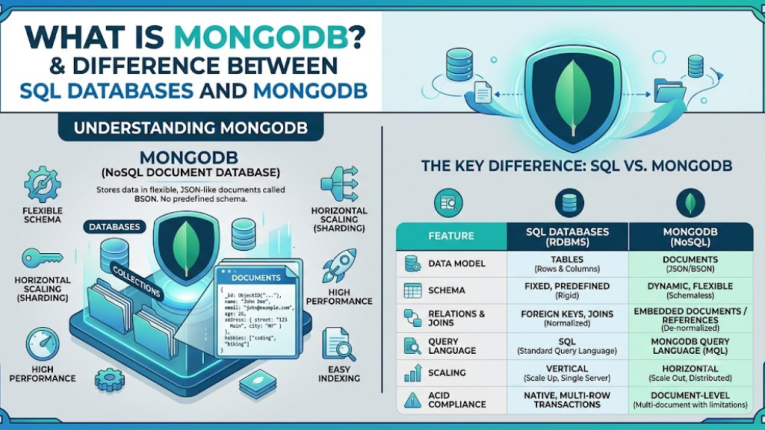
Unlike traditional relational databases such as MySQL or PostgreSQL, which store data in rows and tables, MongoDB stores data in documents. These documents are saved in BSON (Binary JSON) format, allowing you to store structured, semi-structured, and even unstructured data with greater flexibility.
Because MongoDB uses a flexible document model, you don’t need to define a fixed schema before storing data. This makes it an excellent choice for modern applications where data structures may change over time.
The Core Difference Between SQL Databases and MongoDB
Traditional SQL databases organize related data into separate tables and use foreign keys and JOINs to retrieve connected information.
In MongoDB, related information is often stored together within a single document. This reduces the need for complex joins, improves query performance, and makes application development faster and easier.
This document-oriented approach allows MongoDB to handle modern application requirements, making it a popular choice for web development, mobile applications, IoT, and cloud computing.
Key Concept Comparisons: SQL vs MongoDB
If you’re familiar with relational databases like MySQL, PostgreSQL, or SQL Server, understanding MongoDB becomes much easier by comparing similar concepts. Here are the key differences:
1. Database
SQL: A database is a container that stores multiple tables.
MongoDB: A database is also a container, but it stores multiple collections instead of tables.
2. Table → Collection
SQL: Data is organized into tables consisting of rows and columns.
MongoDB: Data is organized into collections, which contain related documents. A collection is the MongoDB equivalent of a table.
3. Row → Document
SQL: Each row represents a single record in a table.
MongoDB: Each document represents a single record and is stored in BSON (Binary JSON) format, allowing flexible data structures.
4. Column → Field
SQL: Tables are divided into columns with predefined data types.
MongoDB: Documents contain fields, which are key-value pairs. Different documents in the same collection can have different fields.
5. Primary Key → _id Field
SQL: Every table typically has a primary key to uniquely identify each row.
MongoDB: Every document automatically contains a unique _id field, which serves as its primary identifier.
6. Foreign Key and Joins → Embedded Documents or $lookup
SQL: Relationships between tables are created using foreign keys and JOIN operations.
MongoDB: Relationships can be handled by:
- Embedding related data within a document for faster access.
- Using the $lookup aggregation stage to perform join-like operations across collections when necessary.
7. Index
SQL: Indexes improve query performance by reducing the amount of data scanned.
MongoDB: Indexes work similarly, enabling faster searches, sorting, and filtering of documents while improving query efficiency.
Why Use MongoDB?
Modern applications generate massive amounts of data and require databases that are fast, flexible, and easy to scale. Traditional relational databases work well for structured data, but they can become difficult to manage when applications grow or data changes frequently.
MongoDB is designed to solve these challenges. Its flexible document model, high performance, and built-in scalability make it a popular choice for developers building modern web, mobile, cloud, and enterprise applications.
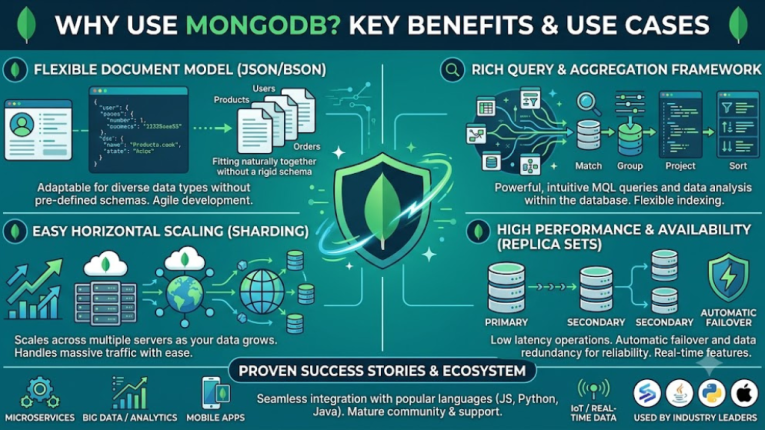
MongoDB offers several advantages that make it a popular choice for modern application development.
1. Natural Fit for Modern Programming Languages
MongoDB stores data as JSON-like BSON documents, which closely match the objects used in programming languages such as JavaScript, Python, Java, C#, and many others.
Unlike traditional SQL databases, where data often needs to be converted between objects and tables, MongoDB allows developers to work with data in a format that is already familiar. This reduces development time, simplifies code, and improves productivity.
2. Flexible Schema for Faster Development
One of MongoDB’s biggest advantages is its flexible schema.
In traditional SQL databases, adding a new column usually requires modifying the database structure, which can be time-consuming for large databases.
With MongoDB, documents in the same collection can have different fields. You can add new data or modify the document structure without changing the entire database schema. This flexibility makes MongoDB ideal for Agile development, where application requirements change frequently.
3. Built-in Horizontal Scalability
As your application grows, your database must be able to handle more users and larger amounts of data.
Traditional relational databases often scale by upgrading to more powerful servers (vertical scaling), which can be expensive and has practical limits.
MongoDB supports horizontal scaling by using Sharding, which spreads data across multiple servers to handle growing workloads efficiently. This helps applications handle high traffic, improve performance, and store massive datasets without relying on a single machine.
Because of this capability, MongoDB is widely used for applications that need high availability and can grow seamlessly as user demand increases.
What are the Advantages of MongoDB?
MongoDB has become one of the most popular NoSQL databases because it offers high performance, flexibility, and scalability. Whether you’re building a small website or a large enterprise application, MongoDB provides several advantages that make development faster and database management easier.
Here are the main reasons why developers and businesses prefer MongoDB.
1. High Speed and Performance
MongoDB is designed to deliver fast read and write operations, making it ideal for applications that handle large volumes of data.
Some reasons for its excellent performance include:
- Fewer JOIN operations: Related data can be stored in a single document, reducing the need for complex JOIN queries.
- Efficient caching: The WiredTiger storage engine uses system memory to cache frequently accessed data, improving response times.
- Powerful indexing: MongoDB supports various index types, including single-field, compound, text, geospatial, and hashed indexes, helping queries run much faster.
2. High Availability and Reliability
MongoDB provides built-in features to keep your database available even if a server fails.
It uses Replica Sets, where:
- One server acts as the Primary node and handles all write operations.
- One or more Secondary nodes continuously copy data from the primary.
- If the primary server fails, MongoDB automatically switches a secondary server to the new primary, ensuring high availability with minimal downtime.
3. Flexible and Powerful Query Language
MongoDB supports a wide range of query operations, allowing developers to retrieve data efficiently.
You can easily perform:
- Simple and complex filtering
- Range queries
- Sorting and pagination
- Regular expression (Regex) searches
- Full-text search
- Geospatial queries for location-based applications
- Data aggregation using the Aggregation Pipeline ($match, $group, $project, $unwind, and more)
These features make MongoDB suitable for everything from simple applications to advanced data analytics.
4. Excellent Developer Experience
MongoDB is easy to integrate with modern programming languages and frameworks.
It offers official drivers for popular languages such as:
- JavaScript (Node.js)
- Python
- Java
- C#
- Go
- PHP
- Ruby
- Rust
Since MongoDB stores data in JSON-like documents, developers can work with familiar data structures, reducing coding effort and speeding up application development.
5. Easy to Scale
MongoDB’s Sharding feature enables applications to scale by dividing data across multiple servers as demand grows.
This allows your application to:
- Handle millions of users
- Store massive amounts of data
- Maintain high performance even under heavy traffic
Because of its built-in scalability, MongoDB is a great choice for cloud-based and enterprise applications.
6. Flexible Schema
Unlike traditional SQL databases, MongoDB does not require a fixed schema.
Documents in the same collection can have different fields, making it easy to:
- Add new features without changing the entire database structure
- Handle changing business requirements
- Develop applications faster using Agile methodologies
This flexibility is one of the main reasons developers prefer MongoDB for modern software projects.
When Should You Use MongoDB?
MongoDB is a flexible and powerful database, but it is not the right choice for every application. The best database depends on your project’s requirements, the type of data you store, and how your application will grow.
Here are some situations where MongoDB is an excellent choice.
When to Use MongoDB
1. E-Commerce Websites
Store products with different details such as size, color, price, RAM, or storage without changing the database structure.
2. Content Management Systems (CMS)
Perfect for storing blogs, articles, comments, categories, tags, and media files.
3. Real-Time Analytics and IoT
Handles large amounts of real-time data from sensors, devices, and monitoring systems with fast read and write performance.
4. Mobile and Gaming Apps
Ideal for managing user profiles, chat messages, game progress, leaderboards, and session data.
5. Large Web Applications
Suitable for cloud applications, social media platforms, and microservices that need high performance and scalability.
When Should You Not Use MongoDB?
MongoDB is not the best choice for every project.
- Financial and Banking Systems: SQL databases are better for complex transactions and strict data consistency.
- Fixed Data Structure: If your data rarely changes and has a fixed schema, relational databases like MySQL or PostgreSQL are usually a better option.
- Complex Table Relationships: Applications that rely heavily on multiple JOIN operations are generally better suited for SQL databases.
What are the Features and Benefits of MongoDB?
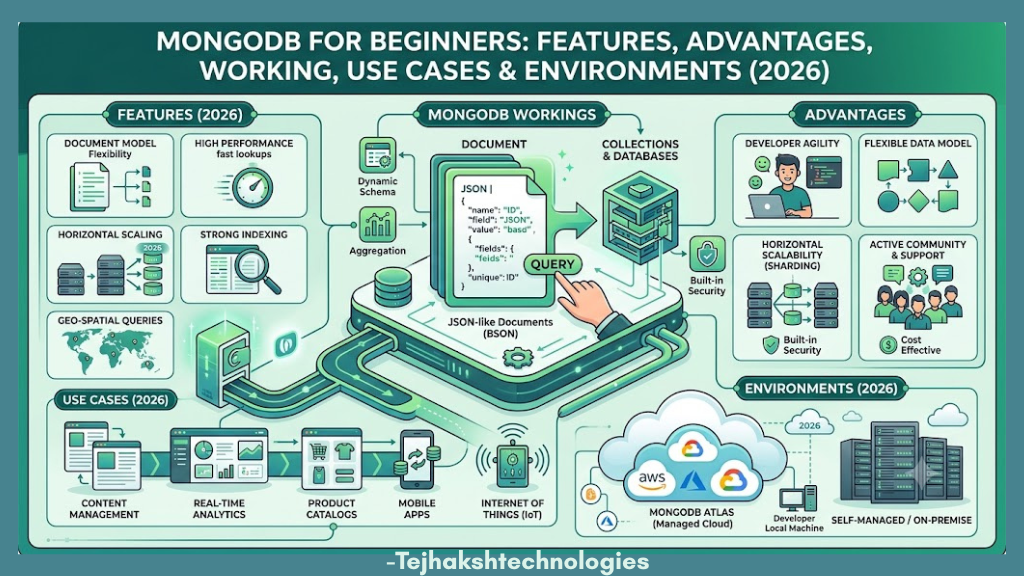
MongoDB offers many powerful features that make it a popular choice for modern applications. These features help developers build fast, scalable, and flexible applications with ease.
Key Features of MongoDB
- BSON Document Storage: Stores data in flexible BSON (Binary JSON) documents.
- Aggregation Framework: Processes and analyzes data using filtering, grouping, and sorting.
- Auto-Sharding: Automatically distributes data across multiple servers for better scalability.
- Full-Text & Vector Search: Supports keyword search and AI-powered semantic search.
- Time-Series Collections: Optimized for storing time-based data like IoT and application logs.
- GridFS: Enables MongoDB to store and manage large files, including images, videos, and PDFs.
Benefits of MongoDB
- Flexible schema that adapts to changing business requirements.
- High performance for fast read and write operations.
- Easy horizontal scaling using Sharding.
- High availability with Replica Sets.
- Supports modern application development for web, mobile, cloud, and AI applications.
- Easy integration with popular programming languages like JavaScript, Python, Java, C#, and Go.
How MongoDB Works (Under the Hood)
MongoDB stores, manages, and retrieves data using a document-based architecture. Understanding how it works helps developers build faster and more scalable applications.
1. Document Storage (BSON Format)
When you save data in MongoDB, it is stored as BSON (Binary JSON) documents.
Why BSON?
- Stores data efficiently.
- Supports more data types than JSON, such as Date, Binary Data, and ObjectId.
- Provides faster data processing and retrieval.
2. WiredTiger Storage Engine
WiredTiger is MongoDB’s default storage engine. It improves database performance by:
- Supporting multiple users at the same time.
- Compressing data to save storage space.
- Protecting data from loss through journaling and recovery.
3. Replica Sets (High Availability)
MongoDB uses Replica Sets to keep data safe and available.
- The Primary node handles all write operations.
- Secondary nodes keep copies of the data.
- If the primary server fails, MongoDB automatically switches a secondary server to become the new primary.
This ensures high availability with minimal downtime.
4. Sharding (Horizontal Scaling)
When data becomes too large for a single server, MongoDB uses Sharding to split it across multiple servers.
The sharding process includes:
- Shard Key: Decides how data is divided.
- Mongos Router: Sends requests to the correct server.
- Config Servers: Store information about the cluster.
Sharding allows MongoDB to handle large datasets and high traffic while maintaining good performance.
MongoDB Environments
MongoDB can be used in different environments depending on your project needs. Whether you’re learning, developing, or running a large application, MongoDB provides suitable deployment options.
1. MongoDB Atlas (Cloud)
MongoDB Atlas is a fully managed cloud database service available on AWS, Google Cloud, and Microsoft Azure.
Best for:
- Production applications
- Startups
- Enterprise projects
- Learning and testing
Key Features:
- Automatic backups
- Auto scaling
- Built-in security
- Free M0 cluster for beginners
2. MongoDB Community Edition
MongoDB Community Edition is the free, open-source version that you can install on Windows, Linux, or macOS.
Best for:
- Local development
- Learning MongoDB
- Small projects
- Self-hosted applications
3. MongoDB Enterprise Advanced
MongoDB Enterprise Advanced is the paid version designed for large organizations.
Best for:
- Enterprise applications
- Private cloud or on-premise deployments
- High-security environments
Key Features:
- Advanced security
- Authentication support
- Monitoring and management tools
- Enterprise support
4. MongoDB Compass & Mongosh
MongoDB provides two useful tools for working with databases:
- MongoDB Compass: A graphical interface (GUI) for viewing data, running queries, and managing databases.
- Mongosh: A command-line shell (CLI) used to execute queries, manage databases, and perform administrative tasks.
MongoDB Summary Cheat Sheet
Here is a quick summary of the most important MongoDB concepts:
Data Format
- MongoDB stores data in BSON (Binary JSON) format.
- Documents are organized into collections, making data flexible and easy to manage.
Scaling Type
- MongoDB uses Sharding to scale databases horizontally across multiple servers.
- Sharding splits data across multiple servers, helping MongoDB manage large datasets and heavy user traffic efficiently.
High Availability
- MongoDB ensures high availability using Replica Sets.
- A replica set consists of one Primary node and one or more Secondary nodes.
- If the primary server fails, MongoDB automatically elects a new primary, minimizing downtime.
Storage Engine
- MongoDB uses the WiredTiger storage engine by default.
- It provides document-level locking, data compression, and improved read/write performance.
Deployment Options
You can deploy MongoDB in multiple ways depending on your requirements:
- MongoDB Atlas – Fully managed cloud database service.
- MongoDB Community Edition – Free version for local development and learning.
- MongoDB Enterprise Edition – Advanced version for production environments with enterprise-grade security and support.
Primary Tools
MongoDB offers several tools for managing and interacting with databases:
- Mongosh – Command Line Interface (CLI) for executing MongoDB commands.
- MongoDB Compass – Official graphical user interface (GUI) for database management.
- Language Drivers – Official drivers for programming languages such as Java, Python, Node.js, C#, PHP, Go, Ruby, and many others.
Conclusion
MongoDB is one of the most popular NoSQL databases because it is fast, flexible, and easy to scale. Its document-based structure makes it simple to store and manage data, making it an excellent choice for modern web, mobile, cloud, and enterprise applications.
Whether you are a beginner learning databases or a developer building large-scale applications, MongoDB offers the tools and features needed to create reliable and high-performance solutions.
If you’re ready to get started, create a free MongoDB Atlas account, launch your first database cluster, connect using MongoDB Compass or mongosh, and begin building your first MongoDB application.

Leave a Comment