


- July 21, 2026
- Tejhaksh
- 0 Comments
- GitHub, Uncategorized
The Ultimate GitHub Guide for Beginners and Professionals (2026)
Whether you are writing your first line of code, managing an enterprise cloud infrastructure, or coordinating complex multi-agent AI development, GitHub sits at the absolute center of modern software creation.
As software development has evolved into a collaborative, AI-assisted craft, understanding GitHub is no longer optional—it is a foundational requirement for developers, data scientists, project managers, and tech leaders alike.
This comprehensive guide breaks down everything you need to know about GitHub: how it operates, why millions of engineers rely on it daily, its key features, top alternatives, and step-by-step concepts to take you from beginner to professional.
What is GitHub?
At its core, GitHub is a cloud-based platform for hosting, managing, and collaborating on software development projects. Built on top of the Git distributed version control system, GitHub provides a web-based graphical interface and a suite of developer services that allow individuals and teams to store code, track changes, manage tasks, and deploy applications.
Acquired by Microsoft in 2018, GitHub has expanded from a simple repository host into an all-in-one developer ecosystem featuring AI pair programming, cloud-hosted dev environments, continuous integration/continuous deployment (CI/CD) pipelines, and enterprise security management.
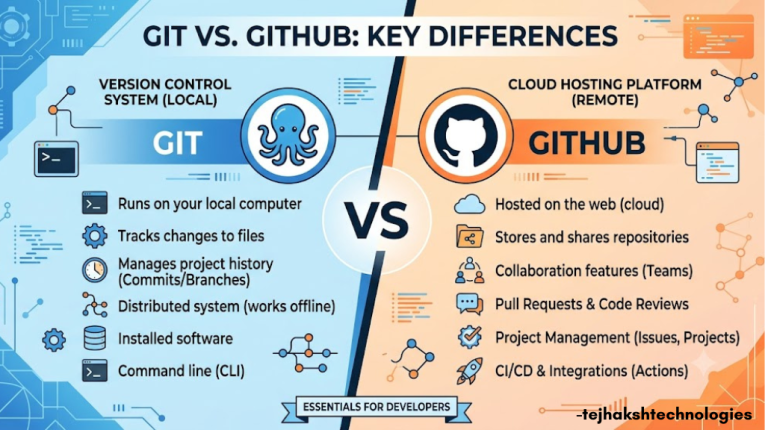
Git vs. GitHub: Key Differences
1. Primary Purpose
Git: A distributed version control system used to track changes in source code and manage project history locally.
GitHub: A cloud-based platform that hosts Git repositories and enables collaboration, code sharing, and project management.
2. Where It Runs
Git: Installed and runs locally on your computer.
GitHub: Accessible through the web and hosted on GitHub’s cloud servers (or private enterprise servers).
3. User Interface
Git: Primarily operated through the Command Line Interface (CLI), with support from various third-party GUI tools.
GitHub provides an easy-to-use web interface, GitHub Desktop, mobile apps, and APIs for managing repositories from anywhere.
4. Internet Connectivity
Git: Works completely offline. You can create commits, branches, and manage version history without an internet connection.
GitHub: Requires an internet connection to push, pull, synchronize repositories, collaborate with others, and access cloud-based features.
5. Core Features
Git
Tracks changes in files and source code
Creates and manages branches
Merges code from different branches
Maintains complete commit history
Supports local version control
GitHub
Hosts Git repositories online
Enables pull requests and code reviews
Provides issue and bug tracking
Supports GitHub Actions for CI/CD automation
Offers project management tools
Includes GitHub Copilot for AI-assisted coding
Facilitates team collaboration and open-source development
6. Best Use Cases
Git: Ideal for developers who need reliable local version control and source code management.
GitHub: Best for teams, organizations, and open-source projects that require cloud storage, collaboration, automation, and code review workflows.
Quick Summary
Git is a version control system that records and manages changes made to your code over time.
GitHub is the cloud platform that uses Git to help developers store, collaborate on, review, and deploy code efficiently.
What is GitHub Used For?
GitHub serves as the digital workspace for modern software construction. Its primary use cases center around source code safety, team communication, and automated delivery:
- Source Code Hosting and Backup: Storing codebase files securely off-site with full version protection against data loss.
- Asynchronous Collaboration: Enabling developers around the globe to propose code additions through Pull Requests, complete peer reviews, and leave granular line-item feedback.
- Issue and Project Tracking: Manage bugs, feature requests, development tasks, and project progress in one centralized workspace.
- Automated Testing and Deployment (CI/CD): Automatically test, build, and deploy applications whenever code changes are pushed or merged.
- Open-Source Software (OSS) Governance: Allowing worldwide communities to contribute to popular frameworks, libraries, and tools like React, Python, and Linux.
Who Uses GitHub?
While originally created by software engineers for software engineers, GitHub’s reach extends across diverse disciplines and organizational structures:
- Individual Developers & Hobbyists: Building personal side projects, learning new programming languages, and maintaining an online portfolio for hiring managers.
- Open-Source Maintainers: Hosting community projects, reviewing contributions from developers globally, and releasing open-source software dependencies.
- Startups & Scale-ups: Fast-tracking product development with automated CI/CD pipelines, integrated AI agents, and rapid cloud environment provisioning.
- Large Enterprises: Managing multi-team access policies, enforcing strict compliance standards, securing internal codebases (InnerSource), and scaling development using enterprise data-residency solutions.
- Data Scientists & Researchers: Use GitHub to share Jupyter Notebooks, manage datasets, track experiment changes, and collaborate on machine learning and AI projects.
- Technical Writers & Designers: Maintaining markdown documentation, managing website content via GitHub Pages, and keeping design asset histories synchronized.
How Does GitHub Work?
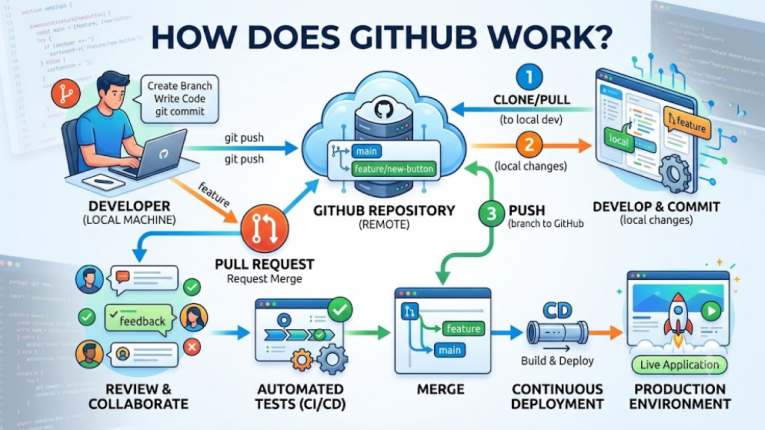
GitHub helps developers manage code, collaborate with teams, and track changes using Git. The basic workflow is simple:
Create Repository
│
▼
Create Branch
│
▼
Make Changes & Commit
│
▼
Push to GitHub
│
▼
Open Pull Request
│
▼
Code Review & Testing
│
▼
Merge to Main Branch
GitHub Workflow:
Create a repository → Create a branch → Make changes → Commit → Push → Open a Pull Request → Review → Merge.
- Create a Repository – Store your project files on GitHub.
- Create a Branch – Work on new features or bug fixes without affecting the main project.
- Commit Changes – Save your work with a meaningful commit message.
- Push to GitHub – Upload your changes to the online repository.
- Open a Pull Request – Request your team to review your code.
- Review & Test – Team members review the code and automated tests check for errors.
- Merge – After approval, the changes are merged into the main branch.
Benefits and Features of GitHub
GitHub offers powerful tools that help developers write better code, collaborate with teams, automate tasks, and improve software security. Here are some of its key features:
1. GitHub Copilot (AI Coding Assistant)
- Helps developers write code faster using AI.
- Suggests code, functions, and entire code blocks.
- Assists with debugging, code completion, and learning new programming languages.
- Improves productivity and reduces development time.
2. GitHub Codespaces
- Provides a ready-to-use cloud development environment.
- Start coding from any device without installing software.
- Includes pre-configured tools, extensions, and terminals.
- Ideal for remote development and team collaboration.
3. GitHub Actions
- Automates development workflows.
- Runs tests automatically whenever code is updated.
- Builds and deploys applications using CI/CD pipelines.
- Saves time by reducing manual tasks.
4. Security Features
GitHub helps keep your code secure with built-in security tools.
- Secret Scanning: Detects accidentally exposed API keys, passwords, and tokens.
- Dependabot: Finds outdated or vulnerable dependencies and suggests automatic updates.
- Code Scanning: Identifies security issues and coding errors before deployment.
5. Team Collaboration
- Work together on the same project with ease.
- Review code using Pull Requests.
- Track bugs and feature requests with Issues.
- Manage projects using discussions and project boards.
6. Enterprise Features
- Secure access with Single Sign-On (SSO).
- Manage team permissions and repository access.
- Maintain audit logs for security and compliance.
- Suitable for businesses and large organizations.
Real-World GitHub Use Cases
To see how GitHub functions in practice, consider these practical real-world applications across various sectors:
Use Case A: Open-Source Community Collaboration
An open-source library receives a bug report from a user in Tokyo. A developer in London picks up the issue, forks the repository, creates a patch branch, and submits a Pull Request. GitHub Actions automatically verifies the test suite across three operating systems. A maintainer in San Francisco reviews the PR on their tablet, requests one minor tweak, approves the change, and merges it into production—all within a single asynchronous workflow.
Use Case B: Continuous Integration and Deployment (CI/CD) for Web Apps
A SaaS engineering team maintains a web platform. Whenever an engineer merges a feature branch into the main branch:
- GitHub Actions initiates automated unit and integration test scripts.
- Code vulnerability scanners analyze new lines for security flaws.
- Upon test completion, GitHub Actions builds a Docker image and deploys it directly to AWS or Microsoft Azure without human intervention.
Use Case C: Standardized Enterprise Developer Onboarding
When new engineers join a large tech organization, setting up local development tools manually can take days. By leveraging GitHub Codespaces, the company provides new hires with pre-configured cloud environments. The new developer clicks one button in GitHub and instantly accesses a running development stack with all libraries, dependencies, and extensions ready for active coding.
Alternatives to GitHub
While GitHub is the most popular platform for version control and collaboration, several excellent alternatives are available. Each platform offers unique features to meet different development needs.
1. GitLab
GitLab is a complete DevOps platform that combines version control, CI/CD, and project management in one place.
- Supports both cloud-hosted and self-hosted repositories.
- Includes built-in CI/CD pipelines and automation tools.
- Ideal for businesses that need a complete DevOps platform in one place.
2. Bitbucket
Bitbucket is a Git repository hosting platform developed by Atlassian.
- Integrates seamlessly with Jira, Confluence, and Trello.
- Offers built-in code review and collaboration features.
- Best for teams using Atlassian products.
3. Azure DevOps
Azure DevOps is Microsoft’s platform for software development and project management.
- Supports Git repositories, CI/CD pipelines, and Agile planning.
- Integrates with Microsoft Azure and Visual Studio.
- Ideal for businesses using Microsoft technologies.
4. Gitea / Forgejo
Gitea and Forgejo are lightweight, open-source Git hosting platforms.
- Easy to install and self-host.
- Require fewer system resources.
- Perfect for developers who value privacy, customization, and self-managed Git hosting.
5. SourceHut
SourceHut is a simple and lightweight Git hosting platform.
- Focuses on speed, simplicity, and open-source development.
- Supports email-based collaboration and developer-friendly workflows.
- Best for users who prefer a minimal and distraction-free experience.
How to Start Using GitHub
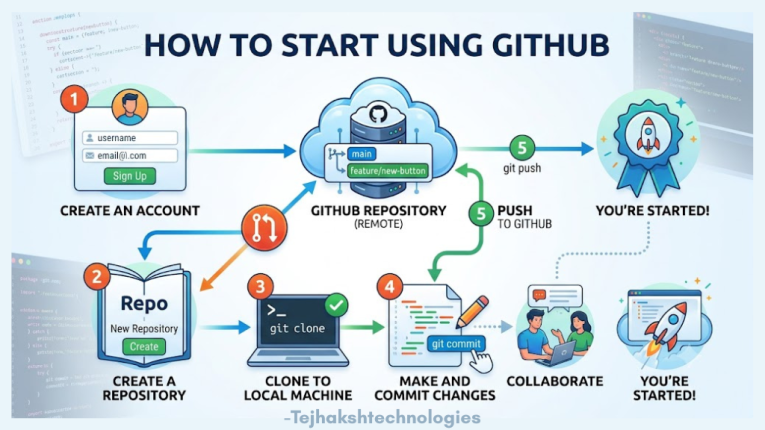
Ready to start using GitHub? Follow these simple steps to create your first project and begin your coding journey.
1. Create a GitHub Account
Sign up for a free GitHub account and enable Two-Factor Authentication (2FA) to keep your account secure.
2. Install Git or GitHub Desktop
Download and install Git or GitHub Desktop to manage your repositories from your computer.
3. Create Your First Repository
Click the + icon on GitHub and select New repository. Give your project a name and create it with a README file.
4. Make Your First Commit
Edit the README.md file, add a short description of your project, and click Commit changes to save your first update.
5. Explore GitHub
Browse open-source projects, follow developers, star repositories you find interesting, and contribute to beginner-friendly projects.
Quick Tip
The best way to learn GitHub is by creating small projects, practicing Git commands, and contributing to open-source repositories regularly.
Conclusion
GitHub has grown from a simple code hosting platform into a complete collaboration hub for modern software development. By bridging distributed version control with AI assistance, automated deployment pipelines, and cloud development environments, it equips developers to turn ideas into production code faster and more securely than ever before.
Whether you prefer command line workflows, visual tools like GitHub Desktop, or automated cloud spaces like Codespaces, mastering GitHub is one of the most impactful career investments you can make today. Create your account, clone your first repo, and start building!
Leave a Comment