
- October 10, 2026
- Tejhaksh
- 0 Comments
- IT Service Management, Uncategorized
What Is ITSM? Meaning, Benefits, Processes, Frameworks & Tools
In today’s digital world, businesses rely on technology to manage daily operations, communicate with customers, protect sensitive information, and deliver products and services. From cloud computing and business applications to networks, laptops, and cybersecurity systems, IT infrastructure plays a critical role in business success. Effective technology management involves more than just resolving technical issues as they arise; it requires a structured approach to maintaining and improving IT services. Organizations need a structured approach to delivering, supporting, and improving IT services. This is where IT Service Management (ITSM) becomes important.
ITSM enables organizations to streamline IT operations, address technical challenges, control system changes, minimize service disruptions, and deliver a better experience for employees and customers. It also helps IT teams prioritize business goals and ensure that technology services contribute to the organization’s overall growth and success.
In this comprehensive guide, we will explain what ITSM is, what ITSM means, why ITSM is important, its major benefits, key processes, popular frameworks, and the best-known ITSM software and tools used by modern organizations.
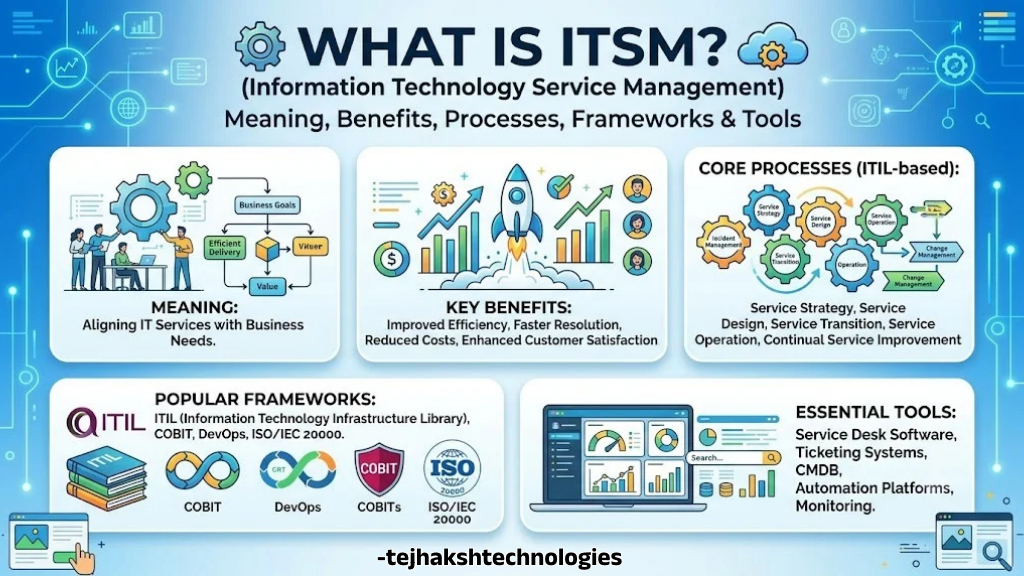
What Is ITSM?
ITSM stands for IT Service Management. It refers to the processes, policies, practices, and technologies organizations use to design, deliver, manage, support, and improve IT services throughout their lifecycle.
In simple terms, ITSM is the way an organization manages its IT services to ensure employees and customers receive reliable, efficient, and consistent technology support.
For example, imagine an employee cannot access a business application. Without a structured ITSM process, the employee might contact several IT team members, repeat the same information, and wait without knowing when the issue will be resolved. With ITSM, the employee can submit a service ticket, the issue is assigned to the appropriate team, progress is tracked, and the solution is documented.
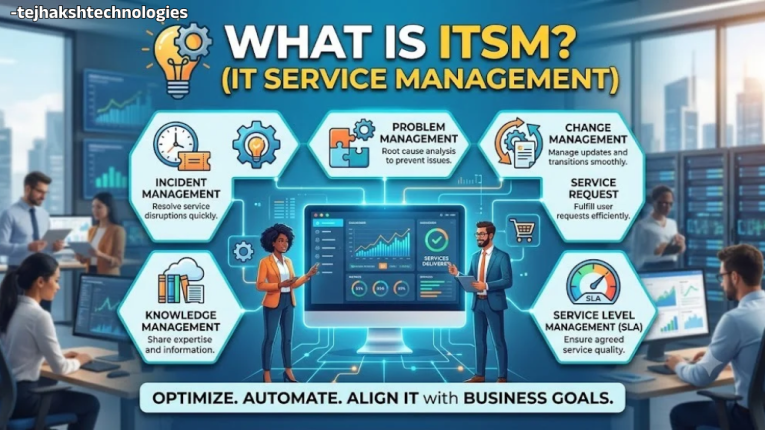
ITSM covers much more than troubleshooting computers. It can include:
- Incident management and technical support.
- Service request management.
- Problem management and root-cause analysis.
- Change enablement and release management.
- IT asset and configuration management.
- Knowledge management.
- Service level management.
- IT service monitoring and continual improvement.
The main objective of ITSM is to ensure that IT services deliver value to the business while meeting agreed service expectations.
What Does ITSM Mean?
The meaning of ITSM is IT Service Management, a systematic approach to managing IT services from planning and implementation to ongoing support and improvement.
Each part of the term has a specific meaning:
- IT (Information Technology): The systems, software, hardware, networks, and digital infrastructure used by an organization.
- Service: A capability or offering that helps users perform their work or achieve a desired business outcome.
- Management: The coordination of people, processes, policies, and technology to deliver services effectively.
Together, these elements describe a structured way to provide dependable IT services.
For instance, an organization’s email system is an IT service. ITSM helps ensure that employees can access their email, report problems, request account changes, and receive support when the service is unavailable.
ITSM also establishes responsibilities, workflows, performance measurements, and procedures so that IT support is not dependent entirely on individual employees or informal communication.
IT Service Management (ITSM): How Does It Work?
IT Service Management brings people, processes, and technology together to deliver IT services efficiently. Instead of treating every technical issue as an isolated task, ITSM creates repeatable workflows for managing service delivery.
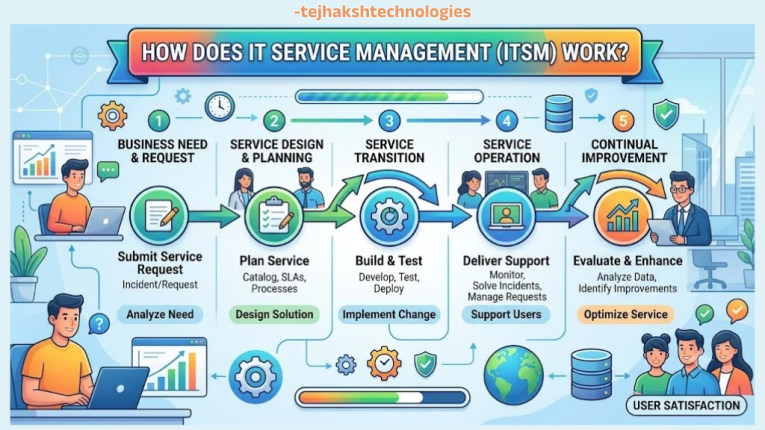
A typical ITSM workflow includes the following steps:
- Identify a need: An employee or customer requires technical assistance, access to a service, or a system change.
- Record the request: The user submits a ticket through a service portal, email integration, or help desk.
- Categorize and prioritize: The IT team classifies the request and determines its urgency and business impact.
- Assign responsibility: The ticket is routed to the appropriate support team.
- Resolve or fulfill the request: The team investigates the issue or completes the requested service.
- Confirm and close: Once the solution is verified, the user is notified, and the ticket is officially marked as resolved and closed.
- Review performance: IT teams analyze trends, identify recurring problems, and improve their processes.
For instance, when a critical business application experiences an outage, incident management focuses on bringing the service back online as soon as possible. Afterward, problem management examines the underlying cause and develops solutions to minimize the risk of similar disruptions in the future.
This combination of immediate support and long-term improvement makes ITSM valuable for organizations of different sizes and industries.
Why Is ITSM Important?
ITSM is important because technology failures, inefficient support processes, and poorly managed changes can interrupt business operations and increase costs. A structured IT service management approach helps organizations manage these risks while ensuring that IT services support business priorities.
Here are the main reasons why ITSM matters.
1. Improves IT Service Reliability
ITSM establishes standard procedures for handling incidents, requests, changes, and recurring issues. These procedures help IT teams deliver more consistent services and reduce avoidable disruptions.
2. Reduces Downtime
Unexpected IT outages can affect productivity, customer satisfaction, and revenue. Incident management and proactive monitoring help teams identify problems, prioritize critical incidents, and restore services more efficiently.
3. Aligns IT With Business Goals
IT departments must understand which services are most important to the organization. ITSM helps connect technical activities with business outcomes, such as employee productivity, customer experience, operational continuity, and cost control.
4. Strengthens Security and Risk Management
ITSM supports controlled changes, access-related service requests, asset tracking, and documented procedures. When integrated with cybersecurity and governance practices, it can help organizations manage technology risks more effectively.
ITSM does not replace security tools or a dedicated information security management system, but it can support their implementation.
5. Improves Employee Experience
Employees need reliable access to applications, devices, networks, and technical assistance. Self-service portals, searchable knowledge bases, and clear ticket updates make it easier for employees to get the support they need.
6. Supports Business Growth
As organizations expand, informal IT support becomes difficult to manage. Standardized ITSM workflows help businesses handle more requests, coordinate multiple teams, and maintain service quality as operations grow.
What Are the Benefits of ITSM?
The benefits of ITSM extend beyond the IT department. When implemented effectively, ITSM improves operational efficiency, service quality, cost management, accountability, and user satisfaction.
1. Increased Productivity
ITSM streamlines routine IT operations by eliminating unnecessary manual work, improving communication, and establishing clear roles and responsibilities. With well-defined processes in place, IT teams and employees can dedicate more time to productive tasks and important business priorities.
For example, an automated password-reset process can reduce the need for manual intervention from the help desk.
2. Better Service Quality
Consistent processes make it easier to establish service standards, monitor performance, and identify gaps. As a result, employees and customers receive more predictable support.
3. Faster Incident Resolution
Ticket prioritization, automated assignment, escalation rules, and access to documented solutions can help IT teams resolve incidents faster.
The results may vary based on the nature of technical problems, team availability, the effectiveness of existing workflows, and how successfully the ITSM solution is implemented.
4. Reduced Operational Costs
ITSM can help reduce unnecessary work, repeated troubleshooting, service interruptions, and inefficient use of IT resources. Organizations can also use service data to identify opportunities for automation and cost optimization.
5. Improved Visibility and Accountability
Centralized ticket records, dashboards, service reports, and defined ownership make it easier to understand what is happening across IT operations.
Managers can identify bottlenecks, review workloads, and determine whether service targets are being achieved.
6. Better Knowledge Sharing
Knowledge management enables businesses to collect and organize useful information, including issue resolutions, technical guidance, operational workflows, and answers to common user queries, making it easier for teams to access and reuse knowledge when needed.
This reduces dependency on individual employees and enables support teams to reuse proven solutions.
7. Greater Customer and Employee Satisfaction
Reliable services and transparent support processes improve the user experience. Employees know where to request help, how their requests are progressing, and where to find answers to common questions.
8. More Controlled IT Changes
A structured change enablement process helps teams assess risks, coordinate approvals when needed, schedule implementations, and prepare rollback plans. This reduces the likelihood of avoidable service disruptions caused by poorly managed changes.
Benefits of ITSM for the IT Department
ITSM supports organization-wide performance while offering IT teams several direct benefits that improve their daily operations, coordination, and service delivery.
1. Better Workload Management
A centralized service desk allows IT managers to view incoming tickets, assign responsibilities, balance workloads, and identify teams that need additional resources.
2. Less Repetitive Manual Work
ITSM automation takes care of routine operations, including ticket distribution, progress notifications, approval tracking, and handling common user requests. By reducing manual workloads, it enables IT professionals to dedicate more time to complex troubleshooting, service improvements, and projects that contribute to organizational objectives.
3. Improved Collaboration
Incident resolution often requires cooperation among service desk staff, infrastructure teams, developers, network engineers, security teams, and external vendors. ITSM creates shared workflows and records that improve coordination.
4. Easier Performance Tracking
ITSM dashboards can measure response times, resolution times, ticket backlogs, service availability, and user satisfaction. These metrics help managers make informed operational decisions.
5. Better Documentation
Documented incidents, known errors, configuration information, and service procedures provide useful context for future troubleshooting.
6. More Effective Resource Planning
By analyzing past service records, IT managers can recognize workload trends, detect repeated technical problems, allocate staff more effectively, and determine which automation or infrastructure upgrades are worth prioritizing.
7. Reduced Operational Stress
Clearly assigned responsibilities and consistent procedures allow IT teams to respond to urgent incidents with better coordination and less confusion. While unexpected technical failures may still occur, ITSM establishes an organized response process that helps teams address service interruptions effectively and maintain operational stability.
What Are ITSM Efficiencies?
ITSM efficiencies refer to the ways organizations optimize IT service delivery, streamline support activities, and maintain technology systems with greater effectiveness. They help organizations achieve better results with less wasted time, fewer unnecessary steps, and more effective use of available resources.
ITSM efficiency is not simply about completing more tickets. It is about resolving the right problems, preventing avoidable work, and delivering reliable services at an appropriate cost.
The following are common examples of ITSM efficiencies.
1. Workflow Automation
Automated workflows can route tickets, notify responsible teams, request approvals, and trigger routine actions. This reduces manual effort and helps prevent requests from being overlooked.
2. Self-Service Support
A self-service portal enables users to submit requests, check ticket status, access approved software, or follow troubleshooting instructions without contacting the service desk for every task.
3. Knowledge-Centered Support
A well-maintained knowledge base helps users and IT agents find solutions to recurring issues. Reusing existing knowledge reduces repeated investigation.
4. Standardized Processes
Using uniform workflows allows IT teams to handle recurring incidents and service requests more consistently, while simplifying employee training and making it easier to assess team performance.
5. Proactive Problem Management
Analyzing recurring incidents helps teams identify underlying causes rather than repeatedly addressing symptoms. Preventing an issue can save more time than resolving it each time it occurs.
6. Better Asset and Configuration Visibility
Accurate information about hardware, software, dependencies, and service ownership helps IT teams understand the potential impact of incidents and changes.
7. Data-Driven Decisions
ITSM reports reveal trends in service demand, resolution delays, recurring failures, and resource utilization. These insights help organizations prioritize improvements based on evidence.
How can organizations measure ITSM efficiency?
Useful performance indicators include:
- Mean time to resolve (MTTR), with the calculation and scope clearly defined.
- Mean time to respond.
- First-contact resolution rate.
- Incident recurrence rate.
- Percentage of requests completed within agreed service targets.
- Ticket backlog and ticket aging.
- Service availability.
- Cost per ticket or service request.
- Self-service adoption rate.
- Customer or employee satisfaction scores.
ITSM performance indicators should be evaluated collectively rather than individually. For instance, a shorter ticket resolution time does not always reflect improved service quality if the same problems continue to occur or users remain unhappy with the support they receive.
What Are ITSM Processes?
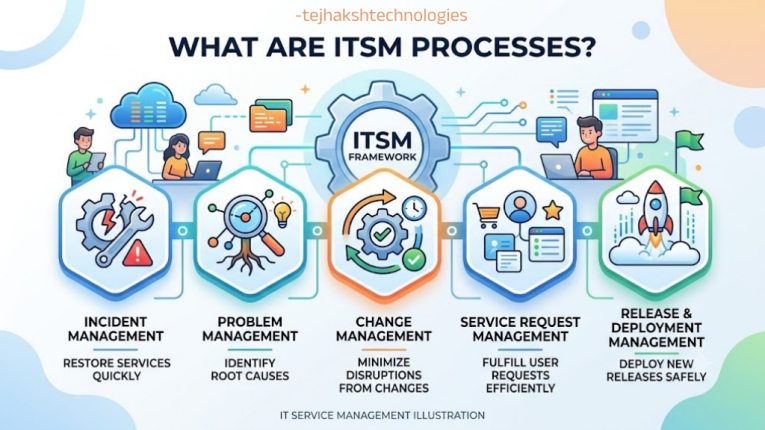
ITSM processes are structured activities that help organizations manage IT services consistently. Each process has a specific purpose, defined responsibilities, and workflows for handling particular service management activities.
The most important ITSM processes include the following.
1. Incident Management
Incident management focuses on restoring normal service as quickly as possible after an unplanned interruption or reduction in service quality.
Examples include an email outage, a failed business application, or an employee’s laptop losing network connectivity.
The main goal is to minimize business disruption. Incident management prioritizes restoration, while deeper investigation may be handled through problem management.
2. Service Request Management
Service request management focuses on processing everyday user needs, such as obtaining information, gaining system access, or requesting authorized IT services and resources through established procedures.
Examples include:
- Requesting a new laptop.
- Installing approved software.
- Resetting a password through an authorized process.
- Requesting access to a business application.
- Creating an employee account.
Standard request workflows make fulfillment more consistent and predictable.
3. Problem Management
Problem management investigates the root causes of IT incidents and works to address them, helping organizations prevent similar failures from happening again and minimize the effects of repeated service interruptions.
For example, if a business application crashes repeatedly because of a database connection issue, problem management investigates the root cause and helps implement a permanent solution or documented workaround.
4. Change Enablement
Change enablement helps organizations assess, authorize when appropriate, schedule, and implement changes to IT services while managing associated risks.
IT changes can include updating applications, enhancing IT infrastructure, installing security fixes, or modifying network settings to improve system performance and reliability.
The process should be proportionate to the risk. Routine, well-understood changes can often follow pre-approved procedures, while higher-risk changes may require additional assessment and coordination.
5. Release Management
Release management coordinates the planning, scheduling, and control of releases into live environments. It helps ensure that new or updated services are introduced in a controlled manner.
Release management works closely with change enablement, deployment practices, testing, and operational support.
6. IT Asset Management
IT asset management (ITAM) manages the lifecycle of IT assets, including their acquisition, use, maintenance, and retirement.
It can cover laptops, servers, software licenses, mobile devices, and other technology resources.
Effective ITAM helps organizations understand what they own, where assets are located, how they are being used, and when replacements or renewals are required.
7. Configuration Management
Configuration management involves tracking IT assets and maintaining details about their dependencies and interactions. It covers elements such as servers, applications, data systems, network infrastructure, and the services they support, helping teams understand how changes or failures may affect IT operations.
A configuration management database (CMDB) can help teams understand service dependencies and assess the potential impact of incidents or changes.
A CMDB is useful only when its information is sufficiently accurate, relevant, and maintained.
8. Knowledge Management
Knowledge management creates, organizes, maintains, and shares information that helps users and support teams resolve issues and complete tasks.
Examples include troubleshooting guides, frequently asked questions, technical documentation, and known workarounds.
9. Service Level Management
Service level management defines, monitors, and reviews agreed service expectations.
Service level agreements (SLAs) may specify response targets, resolution targets where appropriate, service availability, support hours, and reporting requirements.
An SLA should reflect business needs and operational capabilities rather than relying on arbitrary targets.
10. Monitoring and Event Management
Monitoring and event management helps teams observe IT services and infrastructure, identify significant events, and determine when intervention is necessary.
Monitoring tools may detect unusual resource consumption, application failures, network interruptions, or service availability problems.
Integrating monitoring with ITSM can automatically create incidents or notify the appropriate team when predefined conditions occur.
Also read:
Vue.js vs React.js: Key Differences, Performance, and Which to Choose
Hadoop Distributed File System (HDFS): Architecture, Working, Advantages & Complete Guide
Custom Software vs Ready Software – Which is Better for Business?
Custom Software Development Process: A Step-by-Step Guide for Beginners (2026)
What Are Important ITSM Frameworks?
ITSM frameworks offer a structured set of guidelines and best practices for organizing IT service management activities. By adopting these approaches, businesses can standardize their workflows, enhance service delivery, and ensure that technology operations support their overall business objectives.
Different frameworks serve different purposes, and businesses do not necessarily need to adopt every framework.
1. ITIL
ITIL is a widely recognized framework that helps organizations establish and improve their IT service management practices. It provides guidance for creating, delivering, supporting, and continually improving services.
ITIL 4 introduced a service value system, a service value chain, guiding principles, and a broader view of service management practices.
The framework emphasizes value creation, collaboration, feedback, and continual improvement.
Best suited for: Organizations seeking structured ITSM practices, improved service delivery, and alignment between IT and business objectives.
2. COBIT
COBIT offers a systematic method for governing and controlling an organization’s information technology systems and resources. It enables organizations to align technology strategies with business goals while strengthening risk control, defining responsibilities, and evaluating overall IT performance.
Although COBIT can support ITSM-related governance, it is broader than day-to-day service desk operations.
Best suited for: Organizations that need stronger IT governance, compliance oversight, risk management, and executive-level accountability.
3. ISO/IEC 20000
ISO/IEC 20000 is a globally recognized standard that outlines the requirements for an effective service management system. It helps organizations develop, operate, maintain, and continuously enhance their IT service management practices to ensure consistent service delivery.
Unlike a general collection of recommended practices, the standard provides auditable requirements against which an organization may seek certification through an appropriate certification process.
Best suited for: Businesses seeking a structured service management approach, aiming to meet internationally recognized standards, or needing to fulfill specific client expectations and contractual obligations.
4. DevOps
DevOps is an approach that brings software development and IT operations teams together to improve collaboration, streamline workflows, and deliver software more efficiently.
It focuses on practices such as automated testing, continuous integration, continuous delivery, system monitoring, and ongoing feedback to accelerate development and deployment.
Although DevOps is not a traditional ITSM framework like ITIL, it complements service management by supporting smoother software releases, faster issue detection, and more dependable IT services.
Best suited for: Businesses that develop and maintain software and want to speed up delivery, strengthen teamwork between development and operations, and improve the stability and reliability of their applications.
5. FitSM
FitSM is a lightweight family of standards and guidance for IT service management. It provides a practical approach to establishing essential service management processes without necessarily introducing the full complexity of a larger implementation.
Best suited for: Small and medium-sized organizations, resource-constrained IT teams, and businesses that want to establish a basic service management system.
How to Choose the Right ITSM Framework
Selecting the right framework requires evaluating factors such as company size, compliance obligations, IT service demands, resource availability, and long-term business goals.
- Choose ITIL guidance when you need a broad set of service management practices.
- Consider COBIT when enterprise IT governance and accountability are major priorities.
- Consider ISO/IEC 20000 when formal service management system requirements or certification matter.
- Integrate DevOps methodologies with IT service management to streamline software development, deployment, and ongoing maintenance.
- Consider FitSM when you need a lightweight and practical starting point.
Organizations can combine compatible elements from multiple approaches rather than following one framework rigidly.
ITSM Software and Tools
ITSM software and tools help organizations implement service management workflows, manage support tickets, automate repetitive activities, track assets, maintain knowledge bases, and monitor service performance.
Modern ITSM platforms may also offer AI-assisted ticket classification, conversational support, workflow recommendations, and automated knowledge suggestions. The features offered and how well they perform can differ depending on the chosen software solution and the subscription plan a business purchases.
Below are some widely known ITSM software platforms.
1. ServiceNow
ServiceNow is a comprehensive business platform that helps enterprises streamline IT service management, automate routine processes, oversee technology operations, and integrate various systems across the organization.
Its ITSM solutions enable businesses to handle incidents, process service requests, coordinate changes, organize knowledge resources, and monitor service performance through a centralized platform.
Best suited for: Medium and large organizations that require advanced workflow automation, extensive system integrations, and a scalable solution for managing complex IT operations.
2. Jira Service Management
Jira Service Management, from Atlassian, supports service requests, incident management, change management, and collaboration between IT and software development teams.
Its integration with other Atlassian products can help development and operations teams connect support work with engineering workflows.
Best for: Technology companies, DevOps teams, and organizations that already use Atlassian tools.
3. Freshservice
Freshservice is a cloud-based IT service management platform designed to help teams manage service requests, incidents, assets, and workflow automation.
Its features and interface are intended to make common service management activities accessible to IT teams without requiring every workflow to be built from scratch.
Best for: Small and medium-sized businesses and growing organizations looking for an approachable ITSM platform.
4. ManageEngine ServiceDesk Plus
ManageEngine ServiceDesk Plus offers service desk and ITSM capabilities, including incident and request management, change workflows, asset management, and reporting. Available features vary by edition.
Best suited for: Businesses that need a flexible help desk solution with integrated IT management features and deployment choices tailored to their operational requirements.
5. BMC Helix ITSM
BMC Helix ITSM provides enterprise service management capabilities for managing incidents, changes, service requests, and other IT service workflows. The broader BMC Helix portfolio also supports service operations and automation.
Best for: Large or complex IT environments that require enterprise-grade service management and integration.
6. Zendesk
Zendesk is a support management solution that includes tools for handling tickets, maintaining help articles, automating service tasks, and tracking support performance. Organizations can also use these features to respond to employee concerns and coordinate internal help desk services more efficiently.
While Zendesk supports several service desk functions, it may not offer the same depth of IT-specific features as dedicated ITSM solutions. Businesses should assess its functionality to determine whether it meets their technical support and service management needs.
Ideal for: Businesses aiming to optimize support workflows, strengthen user interactions, and provide reliable assistance to both external customers and internal employees through a unified support system.
How to Choose the Best ITSM Tool
Before purchasing ITSM software, organizations should evaluate their operational requirements rather than choosing a platform based only on brand recognition.
Consider the following factors:
Core features: Confirm that the platform supports your required incident, request, change, asset, and knowledge management workflows.
- Ease of use: A clear interface can improve adoption among employees and IT agents.
- Automation: Review ticket routing, approval workflows, notifications, and opportunities for self-service.
- Integration: Check compatibility with identity management, monitoring, collaboration, asset discovery, and development tools.
- Reporting: Ensure that dashboards support the service metrics your organization needs.
- Scalability: Consider whether the solution can accommodate future users, services, and workflows.
- Security: Evaluate access controls, audit logs, data protection, and relevant compliance requirements.
- Pricing: Compare licensing, implementation, customization, training, and ongoing maintenance costs.
- Vendor support: Review documentation, service availability commitments, technical support, and product development plans.
A short pilot involving real service desk workflows can help validate whether a tool fits your team’s needs.
How to Implement ITSM Successfully
Implementing ITSM successfully requires more than purchasing software. Organizations need clear objectives, appropriate processes, employee involvement, reliable information, and ongoing measurement.
Step 1: Assess Current IT Operations
Review how incidents, service requests, changes, assets, and knowledge are currently managed. Identify recurring problems, process gaps, and areas where users experience delays.
Step 2: Define Business Goals
Set measurable objectives, such as reducing avoidable downtime, improving request fulfillment, increasing user satisfaction, or reducing the ticket backlog.
Step 3: Prioritize Essential Processes
Start with the processes that address the most important business needs. Incident management and service request management are common starting points, followed by problem management, change enablement, and asset management as appropriate.
Step 4: Select Suitable ITSM Software
Choose a platform that supports the organization’s required workflows, security needs, integrations, and reporting requirements.
Step 5: Standardize Workflows
Define ticket categories, priority levels, escalation rules, responsibilities, approval requirements, and service targets. Avoid introducing unnecessary complexity.
Step 6: Train Employees and IT Teams
Explain how to submit requests, use self-service resources, document incidents, and follow established procedures. Adoption is more likely when processes are practical and easy to understand.
Step 7: Measure Performance
Track relevant metrics and review them regularly. Use the results to identify bottlenecks, recurring incidents, and opportunities for automation.
Step 8: Improve Continuously
ITSM should evolve with business requirements. Review user feedback, service data, security needs, and technology changes to keep processes relevant and effective.
Common ITSM Challenges
Although ITSM offers significant advantages, organizations may encounter challenges during implementation.
- Resistance to change: Employees may prefer familiar processes. Training, communication, and early involvement can improve adoption.
- Overcomplicated workflows: Too many approval steps and unnecessary categories can slow down support. Processes should match the risk and complexity of the task.
- Poor-quality data: Inaccurate asset records, incomplete tickets, and outdated knowledge articles reduce the value of reporting and automation.
- Unrealistic service targets: Service commitments should reflect business priorities, team capacity, and technical constraints.
- Integration difficulties: When IT systems operate independently, teams may face duplicated information and additional manual tasks. Evaluating compatibility with existing
- applications before choosing and deploying an ITSM solution can help prevent these problems.
- Lack of continuous improvement: A system that is implemented but never reviewed may become inefficient over time. Regular performance reviews help maintain its value.
Frequently Asked Questions About ITSM
1. What is ITSM in simple words?
IT Service Management (ITSM) refers to the practices and processes businesses use to organize, maintain, and enhance their technology services. It enables IT teams to resolve technical problems, respond to user requests, implement system changes, and maintain consistent IT support.
2. What does ITSM stand for?
ITSM stands for IT Service Management.
3. What is the main purpose of ITSM?
IT Service Management aims to ensure that technology services consistently support organizational goals and user expectations. It strengthens service delivery, reduces potential threats, limits downtime, and helps businesses manage their IT resources more effectively.
4. What are the five main ITSM processes?
Key ITSM processes often include incident handling, service request fulfillment, problem resolution, change management, and IT asset tracking. The specific processes a business adopts will vary based on its IT infrastructure and service requirements.
5. What is the difference between ITSM and a help desk?
A help desk primarily focuses on providing technical assistance and resolving user issues. ITSM is broader and includes the processes, policies, and practices used to manage IT services throughout their lifecycle.
6. Is ITIL the same as ITSM?
No. ITSM is the practice of managing IT services, while ITIL is a framework that provides guidance for implementing and improving service management practices.
7. Which ITSM tool is best?
Choosing the right ITSM platform depends on factors such as company size, available budget, essential features, current IT infrastructure, and the complexity of daily operations. Large enterprises with advanced service management requirements may consider ServiceNow or BMC Helix ITSM, whereas Jira Service Management, Freshservice, and ManageEngine ServiceDesk Plus offer alternatives for organizations with varying needs and resources.
8. Can small businesses use ITSM?
Yes. Small businesses can use ITSM principles to organize support requests, document solutions, manage assets, and standardize routine tasks. A lightweight service desk tool and a few well-defined processes can be an effective starting point.
9. How does ITSM improve business productivity?
ITSM boosts workplace efficiency by minimizing repetitive technical tasks, standardizing support procedures, offering self-service options, strengthening team collaboration, and reducing the likelihood of recurring IT issues.
10. What is the future of ITSM?
The future of ITSM is likely to involve greater workflow automation, AI-assisted support, predictive monitoring, integrated service operations, and more user-friendly self-service experiences. Organizations will still need human oversight, reliable knowledge, appropriate security controls, and clear accountability.
Conclusion
IT Service Management (ITSM) enables organizations to handle their IT services systematically, making daily operations smoother and more efficient. It provides a clear process for solving technical problems, handling service requests, managing system updates, and keeping IT services running smoothly.
Implementing ITSM can help organizations save time, improve service quality, reduce unnecessary work, and provide better support to employees and customers. Frameworks such as ITIL, COBIT, ISO/IEC 20000, and FitSM offer useful guidance, while tools like ServiceNow, Jira Service Management, Freshservice, and ManageEngine ServiceDesk Plus help teams manage their daily IT activities.
Choosing the right ITSM approach depends on a company’s needs, budget, and business goals. Organizations do not need complicated processes to get started. They can begin with basic service management practices, select suitable software, and improve their workflows as their needs grow.
By using effective planning, suitable tools, and ongoing performance evaluations, organizations can improve IT support, resolve technical issues faster, and create a solid base for long-term business growth.
Leave a Comment