Tejhaksh Technologies is the Website designing & Digital Marketing company based in Neemuch, established in 2020 providing Website design, Website development, Logo design, Domain Registration, Web hosting, Android App Development, eCommerce web development, Search Engine Optimization, Bulk SMS etc. We have good experience in developing different platform websites and we keep our eye on the latest technologies to implement on the website for better conversion and user experience.
In the world of digital marketing and SEO, understanding user behavior is crucial for improving a website’s performance. One of the key metrics used to measure how visitors interact with a website is Bounce Rate. This metric helps website owners determine whether users are engaging with their content or leaving the site quickly.
If you run a website, blog, or online business, analyzing your bounce rate can provide valuable insights into how visitors behave on your pages. It shows whether your content is relevant, engaging, and capable of encouraging users to explore more pages on your site.
In this complete guide, we will explain everything you need to know about Bounce Rate, including its meaning, formula, examples, how it works in Google Analytics, and practical strategies to reduce bounce rate and improve overall website engagement and SEO performance.
Bounce Rate is a key website metric that measures the percentage of visitors who land on a webpage and leave the site without taking any further action. This means the user does not click on another link, visit another page, or interact with any element on the website.
In simple terms, when a visitor opens a page on your website and exits without exploring other pages, that session is counted as a bounce. Bounce rate helps website owners understand whether their content is engaging enough to keep visitors interested.
Example
For example, imagine a user finds your blog through a Google search and clicks on one of your articles. If the visitor reads the page and then leaves the website without clicking any other links or navigating to another page, that visit is recorded as a bounce.
Therefore, Bounce Rate represents the percentage of single-page sessions on a website, indicating how many users leave the site after viewing only one page.
In SEO (Search Engine Optimization), Bounce Rate is an important metric that helps measure how engaging and relevant your website content is for visitors. It indicates how many users leave your website after viewing only one page without interacting further.
A high bounce rate may suggest that visitors are not finding the information they expected or that the page is not engaging enough to encourage them to explore more. Several factors can contribute to a high bounce rate, such as:
On the other hand, a low bounce rate suggests that visitors find your content engaging and are likely to explore additional pages on your website. This usually means:
However, it is important to analyze bounce rate along with other key metrics such as average session duration, pages per session, and conversion rate to get a clearer understanding of your website’s overall performance and user engagement.
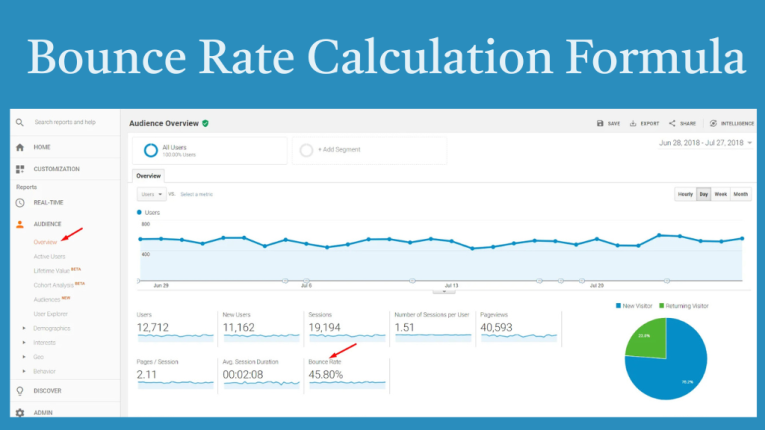
Understanding the Bounce Rate formula is quite simple. It helps you calculate the percentage of visitors who leave your website after viewing only one page without taking any further action.
Bounce Rate Formula
Bounce Rate = (Single-Page Sessions ÷ Total Sessions) × 100
This formula measures how many visitors leave your website after visiting just one page compared to the total number of visitors.
Example Calculation
For example, suppose your website receives 1,000 visitors in a day. Out of these:
Using the formula:
Bounce Rate = (400 ÷ 1000) × 100
Bounce Rate = 40%
This means that 40% of the visitors left your website without interacting with other pages, while the remaining visitors continued browsing or engaging with the site.
Google Analytics is one of the most widely used tools for tracking website traffic and user behavior. It helps website owners analyze how visitors interact with their site and provides valuable data to improve website performance and user experience.
In Google Analytics, Bounce Rate refers to the percentage of sessions where a visitor lands on a webpage and leaves the site without taking any further action. This means the user does not click on another link, navigate to another page, or trigger any interaction event during their visit.
In simple terms, if a visitor opens a page on your website and exits without exploring other pages, that session is counted as a bounce. This metric helps website owners understand how engaging and relevant their content is for visitors.
In Google Analytics 4 (GA4), the definition of bounce rate differs slightly from the one used in the earlier Universal Analytics version. GA4 focuses more on engagement rate, which measures how actively users interact with a website.
A session is considered engaged in GA4 if:
In simple terms, bounce rate in GA4 is the opposite of engagement rate, meaning it represents the percentage of sessions that were not engaged. Understanding this metric helps website owners analyze user behavior and improve overall website engagement and SEO performance.
Many people often confuse Bounce Rate with Exit Rate, but these two metrics measure different aspects of user behavior on a website. Understanding the difference between them is important for analyzing website performance and improving user experience.
Bounce Rate
Bounce Rate refers to the percentage of visitors who land on a webpage and leave the website without visiting any other pages or performing any interaction. In other words, the user enters the site and exits from the same page without exploring further.
Exit Rate
Exit Rate, on the other hand, measures the percentage of visitors who leave the website from a specific page. This means the user may have visited multiple pages on the website before leaving, but the last page they viewed is considered the exit page.
Example
For example, a visitor navigates through your website like this:
Home Page → Blog Page → Product Page → Exit
In this case, the visit is not considered a bounce because the user explored multiple pages before leaving. However, the Product Page is counted as the exit page since it was the last page the visitor viewed before leaving the website.
Also read this:
What is Local SEO? The Link Between Local SEO and Brand Recognition
What is Dwell Time in SEO? Meaning, Importance, and How to Improve It
Mastering Google Ads: Easily Create ads Campaign in 7 Simple Steps-by-Step guides
Advanced Organic Traffic Growth Framework: From 0 to 100K Monthly Visitors
A good bounce rate can vary depending on the type of website and the purpose of the page. Different websites attract different types of visitors, so the ideal bounce rate is not the same for every site.
Below are some general bounce rate benchmarks for different types of websites:
Website Type and Average Bounce Rate
In most cases, a lower bounce rate indicates better user engagement, meaning visitors are exploring more pages on the website and interacting with the content.
However, bounce rate should always be interpreted based on the purpose of the page. For example, a blog post may naturally have a higher bounce rate because users might read the article, find the information they need, and then leave the website without visiting another page.
Therefore, while analyzing bounce rate, it is important to also consider other metrics such as time on page, session duration, and user engagement to get a complete picture of your website’s performance.
A high bounce rate is not always bad. Whether it is good or bad depends on the type of website, page purpose, and user intent. In some cases, visitors may leave the page quickly because they found the exact information they were looking for.
When a High Bounce Rate Can Be Normal
A high bounce rate may be normal in situations such as:
When a High Bounce Rate May Be a Problem
However, a high bounce rate can indicate issues when:
Therefore, bounce rate should always be analyzed along with other important SEO metrics such as session duration, pages per session, and user engagement to understand the true performance of a website.
Understanding the common causes of a high bounce rate is important for improving your website’s performance and user engagement. When visitors leave your site quickly, it often indicates certain issues that need to be addressed.
1. Slow Page Loading Speed
If a website takes too long to load, visitors may leave before the page fully appears. A slow-loading website can negatively impact both user experience and SEO performance.
2. Poor User Experience
A website with confusing navigation, cluttered layouts, or difficult-to-read content can frustrate visitors, causing them to leave without exploring further.
3. Low-Quality or Irrelevant Content
If the content does not provide useful information or solve the user’s problem, visitors are likely to exit the page quickly.
4. Misleading Titles or Meta Descriptions
When users click on a search result expecting certain information but find something different on the page, they may immediately leave the site.
5. Too Many Ads or Pop-ups
Excessive advertisements, pop-ups, or intrusive elements can create a poor browsing experience and drive visitors away from the website.
Improving bounce rate is an important step in optimizing your website for better SEO and user engagement.
Here are some proven strategies to reduce bounce rate.
Website speed plays a crucial role in SEO rankings.
Tips to improve speed:
Faster websites keep visitors engaged and reduce bounce rate.
Content is the most important factor for keeping users on your website.
Make sure your content:
High-quality content encourages users to explore more pages.
Internal links help guide visitors to other pages on your website.
For example:
This encourages users to continue browsing.
Most internet users browse websites using smartphones.
If your website is not optimized for mobile devices, visitors may quickly leave the page.
Use:
A clean and simple design improves user experience.
Make sure your website has:
Visual elements like images, infographics, and videos can keep visitors engaged longer.
This helps increase:
Ensure that your content aligns with the search intent of your users.
For example, if someone searches for “Bounce Rate formula,” the page should clearly explain the formula and examples.
Matching search intent helps reduce bounce rate and improve SEO.
Bounce Rate is an important metric in SEO because it helps you understand how visitors interact with your website. It provides valuable insights into whether users find your content useful, engaging, and relevant to their search queries.
A well-optimized website that offers a good user experience usually shows:
Although bounce rate is not a direct ranking factor in Google’s algorithm, it is still an important indicator of content quality and user experience. When visitors spend more time on your site and interact with multiple pages, it sends positive signals that your content is valuable, which can indirectly help improve your search engine rankings.
Bounce Rate is a key metric for measuring website performance and user engagement. It represents the percentage of visitors who exit a website after viewing just a single page.
By understanding the bounce rate meaning, bounce rate formula, and how it works in Google Analytics, website owners can better analyze user behavior and identify areas for improvement.
To reduce bounce rate and improve SEO, focus on improving page loading speed, creating high-quality content, adding internal links, ensuring mobile-friendly design, and providing a better user experience.
When visitors stay longer and explore multiple pages, it indicates that your website offers valuable content, which can lead to higher engagement and better search engine rankings.
Leave a Comment