


- July 11, 2026
- Tejhaksh
- 0 Comments
- Uncategorized, Web Hosting
What Is Web Hosting? Everything You Need to Know (2026)
In the modern digital landscape, establishing an online footprint is no longer optional for businesses, creators, and entrepreneurs—it is an absolute necessity. Whether you are aiming to launch a massive e-commerce empire, build a personal professional portfolio, or publish a high-traffic media site, the journey always begins with one foundational question: What is web hosting?
While building a beautiful front-end website layout is exciting, that site cannot exist in a vacuum. It needs a secure, stable, and high-performance environment to live on so that users worldwide can access it at any second of the day. This comprehensive guide provides a complete framework for understanding website hosting, detailing how web hosting works, analyzing crucial web hosting features, breaking down the diverse types of web hosting, and helping you identify the best web hosting website to launch your online vision successfully in 2026.
What is Web Hosting?
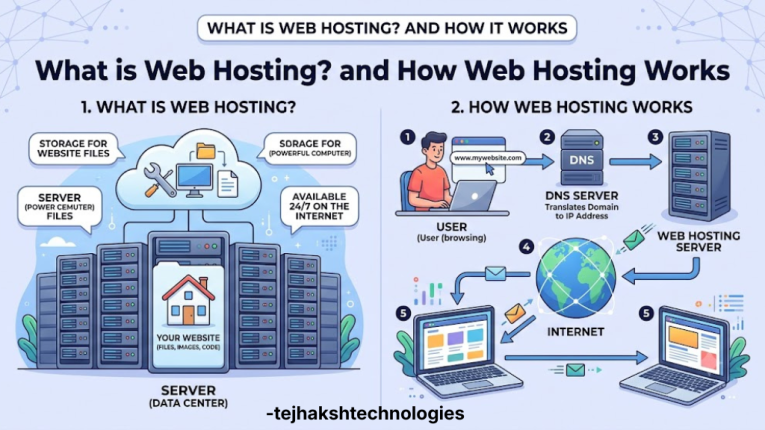
Web hosting is a service that makes your website available on the internet. It stores all the files, images, videos, databases, and code that your website needs to work properly.
Think of it this way: if your website is a house, then web hosting is the land where that house is built. Without land, a house cannot exist. In the same way, without web hosting, your website cannot be seen online.
When you buy a web hosting plan, you are renting space on a powerful computer called a server. This server works 24 hours a day, 7 days a week, so your website is always available to visitors. Whenever someone enters your website address in their browser, the server quickly sends your website’s files to their device, allowing them to view your site.
A good website hosting provider also offers fast loading speeds, strong security, regular backups, and high uptime to ensure your website runs smoothly.
In simple words, web hosting is the foundation of every website. Without web hosting, your website cannot be accessed by anyone on the internet.
How Web Hosting Works
Web hosting works by storing your website on a server and delivering it to visitors whenever they open your website. Here’s a simple step-by-step explanation of the process.
Step 1: A Visitor Opens Your Website
When someone types your website address (for example, www.yourwebsite.com) into their browser or clicks your website link, the browser sends a request to find your website.
Step 2: DNS Finds the Right Server
The Domain Name System (DNS) acts like the internet’s phonebook. It converts your website’s domain name into an IP address and directs the browser to the correct web hosting server where your website is stored.
Step 3: The Server Sends Website Files
After receiving the request, the hosting server quickly collects all the required website files, such as HTML, CSS, JavaScript, images, videos, and database information, and sends them to the visitor’s browser.
Step 4: The Website Appears on the Screen
The browser reads these files and displays your website as a complete web page that users can view, navigate, and interact with.
Domain Name vs. Web Hosting
Many beginners think a domain name and web hosting are the same, but they serve different purposes.
- Domain Name: The address people type to visit your website (for example, www.yourwebsite.com).
- Web Hosting: The online space where all your website files, images, videos, and data are stored.
A simple way to understand this is:
- Domain Name = Your Home Address
- Web Hosting = Your House
Your address helps people find your home, while the house is where everything is kept. In the same way, a domain name helps visitors find your website, and web hosting stores everything needed to make your website work.
Both a domain name and web hosting are essential for creating a website that is accessible to users around the world.
The Types of Web Hosting
Not every website has the exact same baseline technical requirements. A personal recipe blog receiving a few hundred visitors a month requires vastly different architecture than a massive global enterprise processing millions of real-time transactions. To accommodate these varying scales, web hosting services offer a wide variety of specialized configurations.
1. Shared Web Hosting
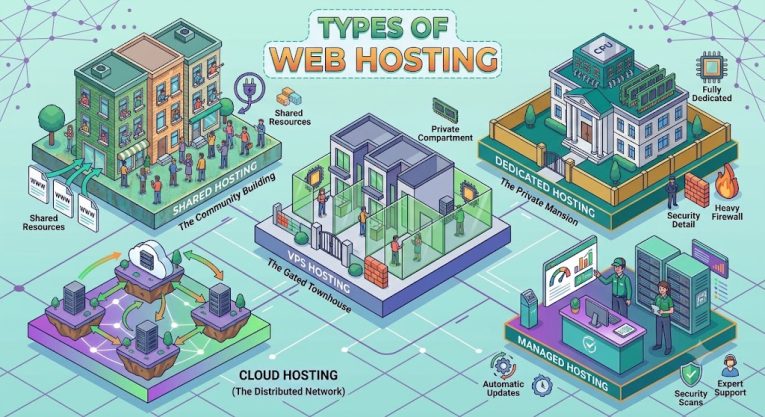
Shared hosting is the entry-level tier of the digital landscape. In this configuration, a single server holds hundreds of individual websites simultaneously. All these sites dynamically share the exact same hardware resources, including CPU processing power, RAM, and total storage space. It is highly analogous to living in a shared apartment complex where everyone shares a single kitchen and bathroom.
- Pros: Extremely economical; excellent for beginners; requires zero advanced technical server administration.
- Cons: Limited resource access; performance drops if neighboring sites experience sudden, massive traffic surges (often called the “bad neighbor effect”).
2. Virtual Private Server (VPS) Hosting
VPS hosting sits comfortably in the middle tier. Using advanced virtualization technologies, a single physical server is segmented into multiple entirely isolated virtual environments. Even though you still technically share physical hardware with others, you are allocated dedicated, guaranteed resources that no one else can touch. It behaves exactly like owning an individual townhouse.
- Pros: Highly stable; dedicated resource allocation; greater custom root access to modify server configurations.
- Cons: Marginally more expensive than shared plans; requires basic system management knowledge.
3. Dedicated Server Hosting
Dedicated hosting offers the highest level of performance, security, and complete server control. When you opt for a dedicated server, you are renting an entire physical computer strictly for your business alone. Every single resource on that machine is focused exclusively on delivering your site’s pages, making it ideal for massive enterprise operations.
- Pros: Total architectural control; maximum possible performance speeds; robust, isolated security.
- Cons: Significantly higher monthly costs; requires an experienced, dedicated systems administrator to maintain securely.
4. Cloud Hosting
Cloud hosting has revolutionized modern IT infrastructure by abandoning reliance on a single physical machine. Instead of relying on a single server, your website is hosted on a network of connected servers spread across multiple locations. If one server experiences hardware failure or goes offline, another machine within the massive cluster seamlessly assumes the workload instantly.
- Pros: Near-infinite scalability; incredible uptime reliability; highly cost-efficient “pay-as-you-use” metric billing models.
- Cons: Pricing can fluctuate unpredictably based on traffic spikes; complex initial configuration paths.
5. Managed WordPress Hosting
Specifically tuned for the popular WordPress Content Management System (CMS), this specialized hosting optimizes server stacks for speed, security, and stability explicitly tailored to WordPress code architectures. The host handles automated daily backups, plugin updates, and core security patches out-of-the-box.
Features of Web Hosting
Choosing a web hosting provider isn’t always easy, especially with so many plans and features available. Instead of focusing on advertisements, check these important features before making your decision.
1. Uptime
Uptime measures how consistently your website remains available to visitors. A good hosting provider should offer at least 99.9% uptime so your visitors can access your website anytime without interruptions.
2. Storage and RAM
Storage is the space where your website files are kept, while RAM helps your website run smoothly. Hosting that uses SSD or NVMe storage provides faster loading speeds and better overall performance.
3. Bandwidth
Bandwidth is the amount of data your website can send and receive. Higher bandwidth allows your website to handle more visitors without slowing down, especially during busy periods.
4. SSL Certificate
An SSL certificate keeps the information shared between your website and visitors safe by encrypting it. It also displays the secure HTTPS padlock in the browser, builds trust with users, and can improve your website’s SEO rankings.
5. Customer Support
Good customer support helps you solve technical problems quickly. Choose a hosting provider that offers 24/7 assistance through live chat, email, or phone.
6. Website Backup
Regular website backups keep your data safe and make it easy to recover lost files. A good hosting service should provide automatic backups so you can restore your website quickly if needed.
7. Security Features
Strong security features such as malware scanning, firewalls, and DDoS protection help keep your website safe from online threats and cyberattacks.
8. Easy Control Panel
A user-friendly control panel allows you to manage your website, domains, emails, databases, and files without requiring advanced technical knowledge.
Best Free Web Hosting Platforms
1. InfinityFree
- Free PHP & MySQL hosting
- Free SSL certificate
- No forced advertisements
- Supports custom domains
- Best for PHP-based websites
2. FreeHosting.com
- Free website hosting
- PHP and MySQL support
- Custom domain support
- No forced ads
- Suitable for personal websites
3. Byet.Host
- 5 GB free storage
- PHP 8 and MySQL support
- Free SSL certificate
- FTP access available
- Best for developers and testing
4. ProFreeHost
- Free PHP & MySQL hosting
- Website builder included
- Free subdomains
- Easy to set up
- Good for beginners
5. Wix
- Free drag-and-drop website builder
- Free hosting included
- No coding required
- Uses a Wix subdomain on the free plan
- Ideal for beginners and portfolio websites
Recommendations
- For HTML/CSS/JavaScript websites: GitHub Pages or Cloudflare Pages.
- For PHP & MySQL websites: InfinityFree or Byet.Host.
- For WordPress beginners: Wix (or a budget paid hosting plan for more flexibility).
Best Web Hosting Websites (2026)
1. Hostinger
- Affordable pricing
- Fast LiteSpeed servers
- Free SSL certificate
- Free domain (selected plans)
- 24/7 customer support
- Best for beginners and small businesses
2. Bluehost
- Officially recommended for WordPress
- Free domain for the first year
- Free SSL certificate
- Easy WordPress installation
- Reliable customer support
3. SiteGround
- Excellent speed and uptime
- Daily backups
- Free CDN and SSL
- Advanced security features
- Great customer support
4. A2 Hosting
- High-speed Turbo Servers
- Free SSL certificate
- Developer-friendly features
- Money-back guarantee
- Good for performance-focused websites
5. DreamHost
- Official WordPress recommendation
- Free SSL certificate
- Unlimited traffic
- Automated backups
- 97-day money-back guarantee
6. Cloudways
- Managed cloud hosting
- Choice of DigitalOcean, AWS, Google Cloud, Vultr, or Linode
- Excellent performance
- Automatic backups
- Best for growing businesses
7. Namecheap Hosting
- Budget-friendly plans
- Free website migration
- Free SSL certificate
- Easy-to-use control panel
- Good for beginners
8. HostGator
- Unmetered bandwidth
- One-click WordPress installation
- Free SSL certificate
- 24/7 support
- Suitable for small and medium websites
9. IONOS
- Low introductory pricing
- Free domain for the first year
- Free SSL certificate
- Strong security features
- Ideal for startups
10. ScalaHosting
- Managed VPS hosting
- Free website migration
- Daily backups
- Advanced security
- Great for business websites
Best Hosting by Use Case
- Best Overall: Hostinger
- Best for WordPress: Bluehost & SiteGround
- Best Budget Hosting: Namecheap
- Best Performance: A2 Hosting
- Best Cloud Hosting: Cloudways
- Best for Small Businesses: Hostinger
- Best for Developers: Cloudways & A2 Hosting
- Best VPS Hosting: ScalaHosting
Conclusion
Web hosting is the backbone of every successful website. It affects your website’s speed, security, uptime, and overall user experience. Choosing the right hosting provider helps your website perform better, stay secure, and remain available to visitors at all times.
Before selecting a web hosting plan, consider your website’s size, expected traffic, budget, and future growth. Compare different hosting types and features to find the option that best fits your needs.
A reliable web hosting service is a long-term investment that supports your website as it grows. By making the right choice today, you can build a fast, secure, and dependable online presence that delivers a great experience for your visitors and helps achieve your online goals.
Leave a Comment