

- September 1, 2026
- Tejhaksh
- 0 Comments
- Software Development, Uncategorized
What is an ERP System? How It Works, Benefits, Types and Key Components
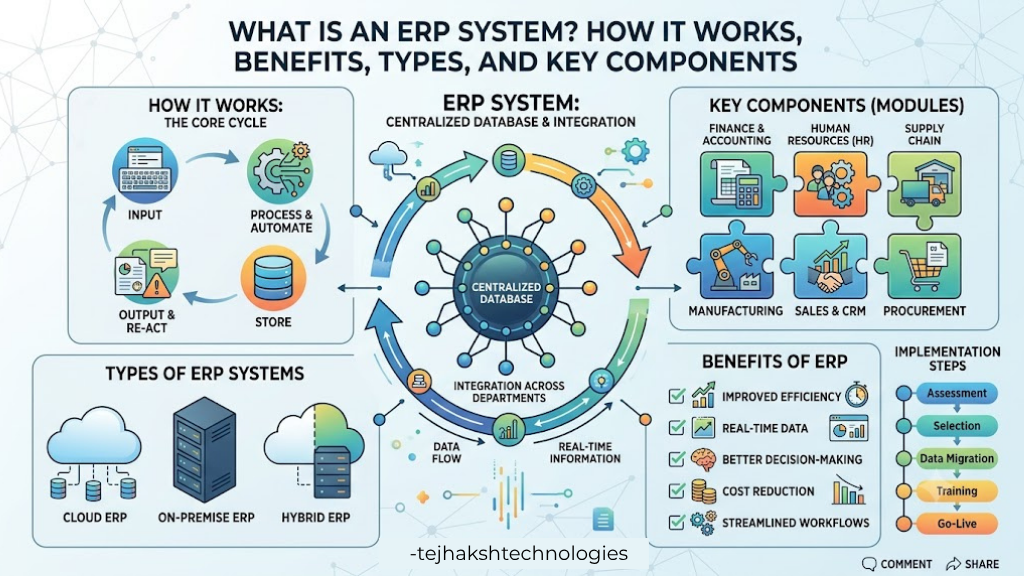
ERP (Enterprise Resource Planning) is a type of business software that helps organizations manage different operations from one centralized system. Instead of using separate software for accounting, inventory, sales, purchasing, human resources and other departments, an ERP system connects these functions and allows them to share information.
Today, businesses of all sizes use ERP software to improve efficiency, reduce manual work and make better decisions using real-time data.
But what is ERP, how does it work, and why is it important for businesses? In this guide, we will explain ERP systems in simple language, including their types, components, benefits, functions, business areas covered and common implementation challenges.
What is ERP?
ERP stands for Enterprise Resource Planning. It is business software that helps companies manage different day-to-day operations from one connected system.
An ERP system can bring important business activities such as sales, accounting, inventory, purchasing, human resources and order management together in one place.
Instead of using separate software for every department, an ERP system allows different teams to work with connected business information. This can reduce repeated data entry and make it easier to manage business operations.
Simple Example of ERP
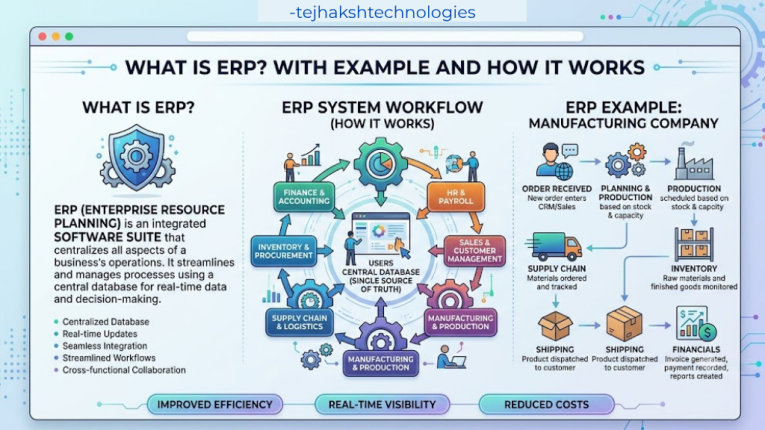
Consider a situation where a customer purchases an item through an online store.
Without an ERP system, the sales team might record the order in one software, the inventory team might update the stock in another, and the accounting team might maintain payment details separately.
With an ERP system, these activities can be connected. When the order is recorded, the system can update the inventory, share the relevant information with accounting and help other departments track the order.
In simple words, ERP helps businesses connect their people, processes and data in one integrated system.
How an ERP System Works
Understanding How an Enterprise Resource Planning System Works is simple if you think of ERP as a central platform that connects different departments of a business.
An ERP system usually has different modules, with each module designed for a specific business function. These modules can share relevant information with each other through a connected system.
For example:
Sales → Inventory → Purchasing → Accounting → Reporting
When information is entered into one module, other connected modules can use that information based on the company’s setup and user permissions.
Step 1: Data is Entered
Employees enter different types of business information into the ERP system, such as:
- Customer orders
- Product details
- Supplier information
- Purchase orders
- Employee records
- Sales transactions
- Inventory updates
- Financial transactions
Step 2: Data is Stored
The information is stored in the ERP system’s database. This creates a centralized source of business data, making it easier for authorized users to access the information they need.
Step 3: Modules Share Information
Connected ERP modules can use relevant information from the shared database.
For example, when a sales order is recorded, the inventory module can use the information to update stock records, while the accounting module can use it for financial processing.
Step 4: Tasks Are Automated
ERP software can automate many routine tasks. These may include:
- Creating invoices
- Updating inventory
- Generating reports
- Sending notifications
- Processing routine transactions
Automation can save time and reduce repetitive manual work.
Step 5: Data Is Used for Decision-Making
Managers can use reports, dashboards and analytics to understand business performance. This information can help them monitor operations and make better business decisions.
What are the Four Types of ERP?
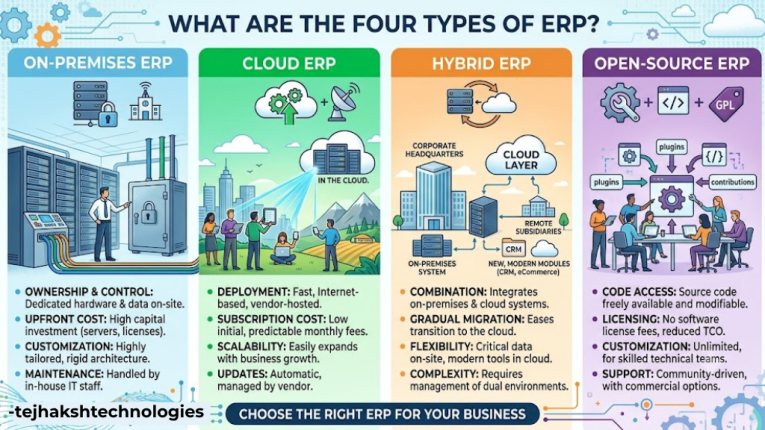
A common question is “What are the four types of ERP?”
ERP systems can be classified in different ways. One common approach is based on how the ERP system is deployed and used.
1. On-Premises ERP
An on-premises ERP is installed and operated on a company’s own servers and IT infrastructure.
This gives the organization more direct control over its system and data. However, the company is also responsible for areas such as hardware, maintenance, security and software updates.
2. Cloud ERP
A cloud ERP is hosted by a service provider and accessed through the internet.
The business does not usually need to manage the underlying servers itself. Cloud ERP can also make it easier for employees to access the system remotely, depending on the provider and service plan.
3. Hybrid ERP
A hybrid ERP combines cloud-based and on-premises systems.
For example, a company may keep certain applications or data on its own servers while using cloud services for other business functions.
4. Two-Tier ERP
A two-tier ERP approach uses two connected ERP systems. It is often used by larger organizations that have a main ERP system at the corporate level and different ERP solutions for subsidiaries, branches or smaller business units.
The systems can be integrated so that important information can be shared between the corporate and local operations.
Important Note
There is no single universal way to classify ERP systems. ERP can also be categorized as open-source or proprietary, general-purpose or industry-specific, and in other ways.
Therefore, the number and names of ERP types may vary depending on the classification method being used.
What Are the 5 Components of ERP?
Another important question is “What are the 5 components of ERP?”
An ERP system is made up of several elements that work together to manage business operations. While the exact classification can vary, five commonly discussed ERP components are hardware, software, database, people and processes.
1. Hardware
Hardware refers to the physical equipment used to run an ERP system. For an on-premises ERP, this may include servers, computers, storage devices and networking equipment.
With a cloud ERP system, most of the required hardware is managed by the service provider.
2. Software
Software is the main ERP application that helps businesses manage their operations. It usually includes different modules for specific business activities.
Common modules include accounting, sales, inventory, purchasing and human resources.
3. Database
The database stores important business information in one organized place. This can include customer details, supplier information, product records, employee data, sales transactions and financial information.
A centralized database allows connected ERP modules to work with consistent and up-to-date information.
4. People
People are an important part of any ERP system. Employees, managers, administrators and other authorized users use the software to enter, manage and review business information.
Proper training helps employees understand the system and use it effectively.
5. Processes
Processes are the steps a business follows to complete its daily activities.
ERP software can help businesses standardize, simplify and automate processes such as purchasing, order management, inventory tracking, accounting and reporting.
Why Is ERP Important for Businesses?
Why Is ERP Important for Businesses? An ERP system helps bring different business activities together in one connected platform. It allows departments to work with shared information instead of managing data across many separate systems.
Businesses handle a large amount of information every day. When different departments use separate software or spreadsheets, it can lead to duplicate data, manual work, errors and difficulty in sharing information.
An ERP system can help businesses:
- Centralize business data in one system
- Reduce repetitive data entry
- Improve communication between departments
- Automate routine tasks
- Track business performance
- Make information easier to access
- Support better planning and decision-making
- Create more consistent business processes
For growing businesses, an ERP system can be especially useful because it helps manage increasing amounts of data and more complex operations.
Benefits of ERP (Enterprise Resource Planning)
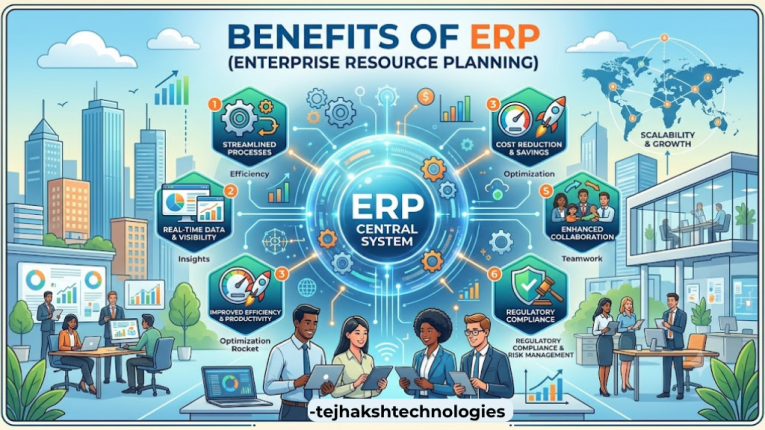
An ERP system can help businesses manage their daily operations more efficiently by connecting different departments and keeping important information in one place. However, the actual benefits depend on the ERP software, implementation and how effectively employees use it.
Here are some of the key benefits of Enterprise Resource Planning (ERP):
1. Centralized Data
ERP software stores important business information in one connected system. This makes it easier for authorized employees to find and use accurate information when needed.
2. Improved Productivity
ERP can automate many repetitive tasks and reduce manual data entry. This saves time and allows employees to focus on more important business activities.
3. Better Reporting
ERP systems can generate reports, dashboards and business insights. Managers can use this information to monitor sales, inventory, expenses and overall business performance.
4. Better Coordination Between Departments
Different departments such as sales, finance, purchasing and inventory can work with shared information. This can improve communication and reduce confusion caused by separate systems.
5. Improved Inventory Management
ERP software helps businesses keep track of stock levels, purchases, product movements and warehouse information. This can make inventory management more organized.
6. Better Financial Management
ERP finance and accounting modules can help manage invoices, expenses, payments, financial records and reports in a more organized way.
7. Supports Business Growth
A suitable ERP system can support a growing business by providing tools for managing increasing amounts of data, customers, products and business activities.
8. Better Decision-Making
ERP provides access to useful and timely business information. Managers can use reports and data to understand business performance and make more informed decisions.
What Business areas does an ERP System Cover?
The ERP software and the needs of the organization. Many ERP systems are designed to support multiple departments and business functions through one connected platform.
Here are some of the main business areas that an ERP system can cover:
Finance and Accounting
ERP finance modules help businesses manage important financial activities, such as:
- Accounts payable
- Accounts receivable
- General ledger
- Invoicing
- Expense tracking
- Financial reporting
- Budgeting
Human Resources (HR)
HR modules can help manage:
- Employee information
- Attendance and leave records
- Payroll
- Recruitment
- Other HR-related processes
Sales
Sales modules can help businesses manage:
- Customer information
- Quotations
- Sales orders
- Invoices
- Sales activities
Inventory Management
Inventory modules help businesses track:
- Stock levels
- Product movements
- Warehouse information
- Inventory transactions
Procurement
Procurement modules support purchasing activities, including:
- Supplier management
- Purchase orders
- Procurement processes
- Purchasing records
Manufacturing
Manufacturing features can help businesses manage:
- Production planning
- Bills of materials (BOM)
- Work orders
- Production processes
Supply Chain Management
ERP systems can help coordinate:
- Purchasing
- Inventory
- Logistics
- Distribution
- Supply chain activities
Customer Relationship Management (CRM)
Some ERP systems include CRM features or connect with CRM software to help manage:
- Customer interactions
- Leads
- Sales opportunities
- Customer service activities
Project Management
Certain ERP systems also offer project management tools for:
- Project planning
- Resource management
- Cost tracking
- Timeline monitoring
Main Functions of an ERP System
An ERP system helps businesses connect, organize and manage their key operations from one platform.
Some common ERP functions include:
- Financial management – managing accounting and financial transactions.
- Inventory management – tracking products, stock and inventory movements.
- Sales management – managing customer orders and sales processes.
- Purchasing management – managing suppliers and purchase orders.
- Human resource management – managing employee-related information.
- Manufacturing management – supporting production planning and operations.
- Supply Chain Management – overseeing procurement, inventory and the flow of goods.
- Reporting and analytics – providing business reports and performance information.
- Workflow automation – automating repetitive business processes.
- Data management – organizing business information in a centralized environment.
Not every ERP system includes all these functions. Businesses generally select modules according to their requirements.
ERP vs Traditional Business Software
Traditional business software is usually designed to manage one specific area of a business. For example, a company may use separate software for accounting, inventory, HR and sales.
Here are some simple examples:
- Accounting software → Finance
- Inventory software → Stock
- HR software → Employees
- Sales software → Sales
- CRM software → Customer relationships
With separate software, each department may have its own system. This can sometimes make it difficult to share information between teams.
This doesn’t mean every business needs ERP. A small company with simple operations may find individual applications sufficient. However, businesses with complex operations and multiple departments may benefit from an integrated ERP system.
6 ERP Implementation Challenges
Although ERP systems offer many benefits, implementing one can be a complex process. Businesses should understand the possible challenges before starting an ERP project.
1. High Implementation Cost
ERP implementation may involve software costs, consulting, customization, data migration and employee training. A clear budget can help avoid unexpected expenses.
2. Data Migration
Moving data from old software to a new ERP system can be difficult. Businesses may need to clean, check and organize data before transferring it.
3. Employee Resistance
Employees may find a new ERP system difficult or unfamiliar at first. Proper communication, training and support can make the transition easier.
4. Customization
Every business has different processes. Too much customization can make the ERP system more complicated and expensive to maintain. Businesses should use standard features wherever possible.
5. Training
Employees need proper training to use the ERP system effectively. Without sufficient training, the business may not get the full benefit from the software.
6. Implementation Time
ERP implementation can take weeks, months or even longer, depending on the size and complexity of the business. Good planning can help reduce delays and disruption.
How to Choose the Right ERP System?
Choosing the right ERP system is an important decision for any business. Companies should not choose software just because it has many features. The ERP should match the business’s actual needs, budget and future plans.
Here are some important factors to consider:
1. Understand Your Business Needs
First, identify the problems you want the ERP system to solve. Make a list of your departments, daily processes, business requirements and reporting needs.
2. Check the Available Modules
Make sure the ERP provides the modules your business needs, such as accounting, inventory, sales, HR, manufacturing and procurement.
3. Consider Business Growth
Choose an ERP system that can support your business as it grows. The software should be able to handle more customers, employees, products, transactions and data when required. Important decision for any business.
4. Check Integration Options
Find out whether the ERP can connect with the other software and services your business already uses. Good integration can make it easier to share information between systems.
5. Consider Security
Check the ERP provider’s security features, including user permissions, data protection, backups and access controls. Business data should be protected from unauthorized access.
6. Calculate the Total Cost
Don’t look only at the software price. Consider other costs such as implementation, customization, training, support and maintenance.
7. Check Customer Support
Reliable technical support can be very helpful during implementation and after the ERP system is launched. Check what type of support the provider offers and how quickly they respond to issues.
Conclusion
An ERP system helps businesses connect their major operations through an integrated software platform. Instead of keeping information in disconnected systems, ERP can bring areas such as finance, sales, inventory, purchasing and HR into one connected environment.
Understanding what is ERP, how an ERP system works, the types and components of ERP, benefits of ERP and its main functions can help businesses decide whether this technology is suitable for their needs.
At the same time, ERP implementation requires careful planning. Businesses need to consider costs, data migration, employee training, customization, security and implementation time before making a decision.
When selected and implemented properly, an ERP system can help organizations streamline processes, improve access to business information and create better coordination between departments.
Leave a Comment